

Please name your Example notebook as transparently as possible. Feel free to add a description of the workflow’s goal. [Remove this line when creating your example]
Example Notebook Template#
Author of this template : Michèle Masson-Trottier [Remove this line when creating your example]
Author: Include the name of all authors of the workflow showcased in the example notebook.
Date:
License:
Note: If this notebook uses neuroimaging tools from Neurocontainers, those tools retain their original licenses. Please see Neurodesk citation guidelines for details.
✨ Use of AI ▽
This notebook was generated with assistance from [Model name] across several iterations [or specify use] and then revised by the author. The author reviewed the final content and takes responsibility for it.
[Remove this cell if not applicable. Note: it’s a dropdown markdown cell - by clicking on it, you will see the entire content]
Citation and Resources:#
Please include the citations for all tools, software, and publications referenced in the workflow. If you are basing your workflow on another previously published example notebook, please cite the name and DOI.
Tools included in this workflow#
Cite the tools based on their preferred method (example through a Zenodo DOI or a publication)
Workflows this work is based on (if applicable)#
If you started from another published workflow, please cite it here
Publications#
Any publication that helped you build your example should be cited here
Educational resources#
Any educational resource (for example Andy’s Brain Book, FSL tutorials…) should be cited here.
Dataset#
Please cite the database and dataset used in your example
Optional: Add a Table of Contents (ToC) below if it helps navigation during interactive use on Neurodesk. When rendered on GitHub Pages, a sidebar ToC is already available, so an inline ToC may be unnecessary.
Each link must match a corresponding section heading: ## 1. Data Preparation → #1-Data-Preparation (keep spaces as hyphens, preserve capital letters), as demonstrated in the next cell.
[Remove this cell when creating your example]
Table of content#
1. Data Preparation
2. Analysis
3. Results
[Remove this cell if no ToC is used in your notebook]
Load software tools and import python libraries#
Please have a bloc for loading the different modules needed for your example. If you can not find all the required tools in Neurodesk, feel free to add tools using the web-based GUI https://neurodesk.org/neurocontainers-ui/
#load FSL 6.0.4
import module
await module.load('fsl/6.0.4')
await module.list()
['fsl/6.0.4']
Please consult the python packages included in the base image see list here. If you are using python packages different than these, be sure to pip install them in the workflow.
%%capture
!pip install pydicom
# Import the necessary libraries
import pydicom # Library to work with DICOM files
import matplotlib.pyplot as plt # Plotting library for displaying images
import os # Standard library to interact with the filesystem
1. Data Preparation#
Please indicate clearly where the data is sourced. In this template, there’s an example for Datalad and OSF
Datalad#
%%bash
# Install the dataset from GitHub using DataLad.
# Replace the URL with the one corresponding to the OpenNeuro dataset you want to use.
datalad install https://github.com/OpenNeuroDatasets/ds000102.git
# Navigate into the dataset directory.
# This should match the name of the dataset repository.
cd ds000102
# Optional: List available subjects
ls -d sub-*
# Download data for a specific subject (e.g., sub-08).
# You can change the subject ID to the one you're interested in.
datalad get sub-08
sub-01
sub-02
sub-03
sub-04
sub-05
sub-06
sub-07
sub-08
sub-09
sub-10
sub-11
sub-12
sub-13
sub-14
su
b-15
sub-16
sub-17
sub-18
sub-19
sub-20
sub-21
sub-22
sub-23
sub-24
sub-25
sub-26
OSF#
# Use the OSF client to clone the contents of the OSF project with ID 'ru43c' into the current directory
# The output is suppressed for cleaner display using > /dev/null 2>&1
!osf -p ru43c clone . > /dev/null 2>&1
# Extract the contents of the downloaded tar archive, which contains DICOM files
!tar xf osfstorage/dicoms-unsorted.tar
# Remove the now-unneeded 'osfstorage' directory to keep things tidy
!rm -rf osfstorage/
# Display the top of the folder tree for the extracted DICOM files (limited with `head` to avoid overwhelming output)
!tree dicoms-unsorted | head
# Print a count of how many unsorted DICOM files were extracted
!echo -e "...\nThere are `ls dicoms-unsorted | wc -l` unsorted DICOMs in ./dicoms-unsorted/"
dicoms-unsorted
├── MR.1.1.dcm
├── MR.1.10.dcm
├── MR.1.100.dcm
├── MR.1.101.dcm
├── MR.1.102.dcm
├── MR.1.103.dcm
├── MR.1.104.dcm
├── MR.1.105.dcm
├── MR.1.106.dcm
...
There are 1216 unsorted DICOMs in ./dicoms-unsorted/
Visualisation of a dicom (one method for example)#
# Define the path to a DICOM file
# You can change this to any other file in the dicoms-unsorted/ directory
dcm_path = "./dicoms-unsorted/MR.1.2.276.0.7230010.3.1.3.0.4480.1677042698.772469.84.dcm"
# Read the DICOM file into a Python object
ds = pydicom.dcmread(dcm_path)
# ----------------------------
# Inspecting DICOM metadata (optional)
# ----------------------------
# Print a few key metadata fields (can be useful for QC or orientation)
print("Patient ID:", ds.get("PatientID", "N/A"))
print("Modality:", ds.get("Modality", "N/A"))
print("Study Date:", ds.get("StudyDate", "N/A"))
# ----------------------------
# Visualizing the DICOM image
# ----------------------------
# Display the image stored in the DICOM file using matplotlib
# Note: Some DICOM files (e.g., non-image series) may not contain pixel data
plt.imshow(ds.pixel_array, cmap=plt.cm.gray) # Use grayscale color map
plt.title("DICOM Slice: MR.1.1.dcm") # Title of the plot
plt.axis("off") # Hide axis ticks/labels for cleaner view
plt.show()
Patient ID: 1
Modality: MR
Study Date: 20170705
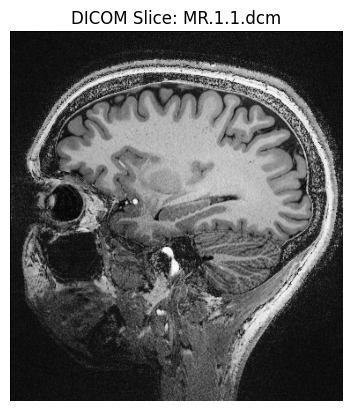
2. Analysis#
Be sure to annotate your example. You can also add Markdown blocs to provide explanations.
!bet ./ds000102/sub-08/anat/sub-08_T1w.nii.gz sub-08_T1w_brain.nii.gz
3. Results#
from ipyniivue import NiiVue
nv = NiiVue()
nv.load_volumes([{"url": "https://huggingface.co/datasets/neurodeskorg/neurodeskedu/resolve/main/data/examples/template/sub-08_T1w_brain_5e88dcf42bc2.nii.gz"}])
nv
Dependencies in Jupyter/Python#
Using the package watermark to document system environment and software versions used in this notebook, alongside the Neurodesktop version extracted from the
JUPYTER_IMAGEorNEURODESKTOP_VERSIONenvironment variables.
import os
%load_ext watermark
%watermark
%watermark --iversions
neurodesktop_version = (
os.environ.get('JUPYTER_IMAGE', '').split(':')[-1] or
os.environ.get('NEURODESKTOP_VERSION', 'unknown')
)
print(f"Neurodesktop version: {neurodesktop_version}")
Last updated: 2026-05-19T03:25:11.243234+00:00
Python implementation: CPython
Python version : 3.13.13
IPython version : 9.12.0
Compiler : GCC 14.3.0
OS : Linux
Release : 6.8.0-106-generic
Machine : x86_64
Processor : x86_64
CPU cores : 16
Architecture: 64bit
ipyniivue : 2.4.4
matplotlib: 3.10.9
pydicom : 2.4.5
Neurodesktop version: 2026-04-28