Run this notebook
Nipype on Neurodesk
An interactive RISE slideshow
Author: Monika Doerig
Date: 3 June 2024
License:
Note: If this notebook uses neuroimaging tools from Neurocontainers, those tools retain their original licenses. Please see Neurodesk citation guidelines for details.
Press Space to proceed through the slideshow.
Citation and Resources:
Tools included in this workflow
Nipype:
Esteban, O., Markiewicz, C. J., Burns, C., Goncalves, M., Jarecka, D., Ziegler, E., Berleant, S., Ellis, D. G., Pinsard, B., Madison, C., Waskom, M., Notter, M. P., Clark, D., Manhães-Savio, A., Halchenko, Y. O., Clark, D., Jordan, K., Dayan, M., Norgaard, M., … Ghosh, S. (2025). nipy/nipype: 1.10.0 (1.10.0). Zenodo. Esteban et al. (2025)
FSL:
M. Jenkinson, C.F. Beckmann, T.E. Behrens, M.W. Woolrich, S.M. Smith. FSL. NeuroImage, 62:782-90, 2012
Smith S. M. (2002). Fast robust automated brain extraction. Human brain mapping, 17(3), 143–155. Smith (2002)
AFNI:
Cox RW (1996). AFNI: software for analysis and visualization of functional magnetic resonance neuroimages. Comput Biomed Res 29(3):162-173. doi:10.1006/cbmr.1996.0014 https://
pubmed .ncbi .nlm .nih .gov /8812068/ RW Cox, JS Hyde (1997). Software tools for analysis and visualization of FMRI Data. NMR in Biomedicine, 10: 171-178. https://
pubmed .ncbi .nlm .nih .gov /9430344/
Educational resources
Gorgolewski, K., Burns, C. D., Madison, C., Clark, D., Halchenko, Y. O., Waskom, M. L., & Ghosh, S. S. (2011). Nipype: a flexible, lightweight and extensible neuroimaging data processing framework in python. Frontiers in neuroinformatics, 5, 13. Gorgolewski et al. (2011)
Jarecka, D., Goncalves, M., Markiewicz, C. J., Esteban, O., Lo, N., Kaczmarzyk, J. & Ghosh, S. (2020). Pydra - a flexible and lightweight dataflow engine for scientific analyses. SciPy 2020, Jarecka et al. (2020)
Dataset
Flanker Task dataset from OpenNeuro:
Kelly AMC and Uddin LQ and Biswal BB and Castellanos FX and Milham MP (2018). Flanker task (event-related). OpenNeuro Dataset ds000102
Kelly, A. M., Uddin, L. Q., Biswal, B. B., Castellanos, F. X., & Milham, M. P. (2008). Competition between functional brain networks mediates behavioral variability. NeuroImage, 39(1), 527–537. Kelly et al. (2008)
Press Space to proceed through the slideshow.
In code cells you press Shift-Enter (as usual) to evaluate your code and directly move to the next cell if it is already displayed.
Press Ctrl-Enter to run a command without direclty moving to the next cell.
Keep pressing Space to advance to the next slide.
Objectives
Know the basics of Nipype
And how to use it on Neurodesk
Learn how Python can be applied to analyze neuroimaging data through practical examples
Get pointers to resources
Be aware ...
Nipype is part of a large ecosystem
Therefore, it is about knowing what is out there and empowering you with new tools
Sometimes, the devil is in the details
Things take time
Table of content
1. Introduction to Nipype
2. Nipype in Jupyter Notebooks on Neurodesk
3. Exploration of Nipype’s building blocks
4. Pydra: A modern dataflow engine developed for the Nipype project
1. Introduction to Nipype

Open-source Python project that originated within the neuroimaging community
Provides a unified interface to diverse neuroimaging packages including ANTS, SPM, FSL, FreeSurfer, and others
Facilitates seamless interaction between these packages
Its flexibility has made it a preferred basis for widely used pre-processing tools such as fMRIPrep
A primary goal driving Nipype is to simplify the integration of various analysis packages, allowing for the utilization of algorithms that are most appropriate for specific problems.
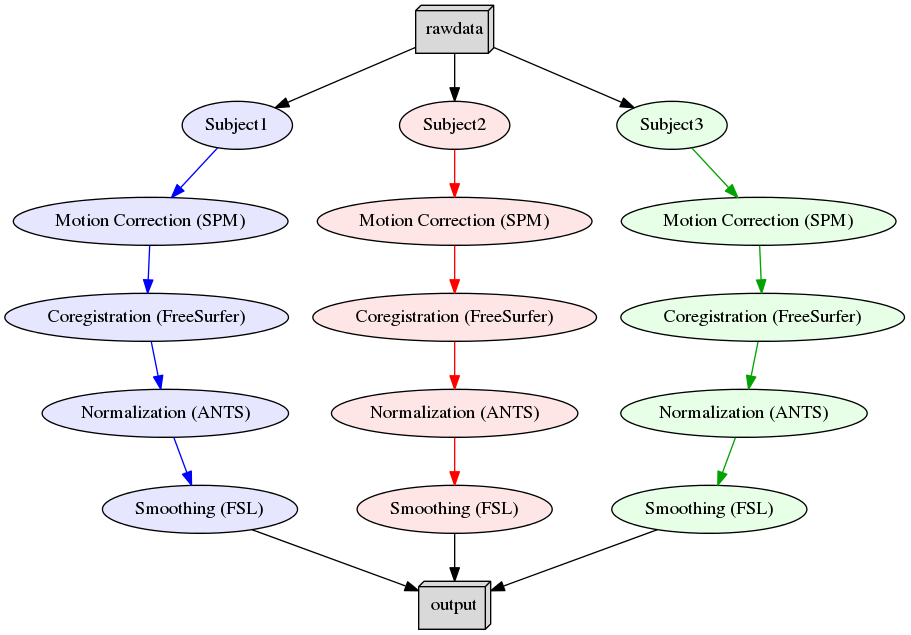
Figure 1: Example Workflow
2. Nipype in Jupyter Notebooks on Neurodesk

Neurodesk project enables the use of all neuroimaging applications inside computational notebooks
Demonstration of the module system in Python and Nipype:
We will use the software tool module to manage and load different software packages and libraires. It simplifies the process of accessing and utilizing various software applications and allows users to easily switch between different versions of software packages, manage dependencies, and ensure compatibility with their computing environment.
# In code cells you press Shift-Enter to evaluate your code and directly move to the next cell if it is already displayed.
# Or press Ctrl-Enter to run a command without direclty moving to the next cell.

# Use module to load any software tool with a specific version
import module
await module.load('fsl/6.0.7.19')
await module.load('afni/22.3.06')
await module.list()
['fsl/6.0.7.19', 'afni/22.3.06']import os
os.environ["FSLOUTPUTTYPE"]="NIFTI_GZ" # Default is NIFTIfrom nipype.interfaces.fsl.base import Info
print(Info.version())
print(Info.output_type())
# If the FSL version is changed using lmod above, the kernel of the notebook needs to be restarted!6.0.7.19
NIFTI_GZ
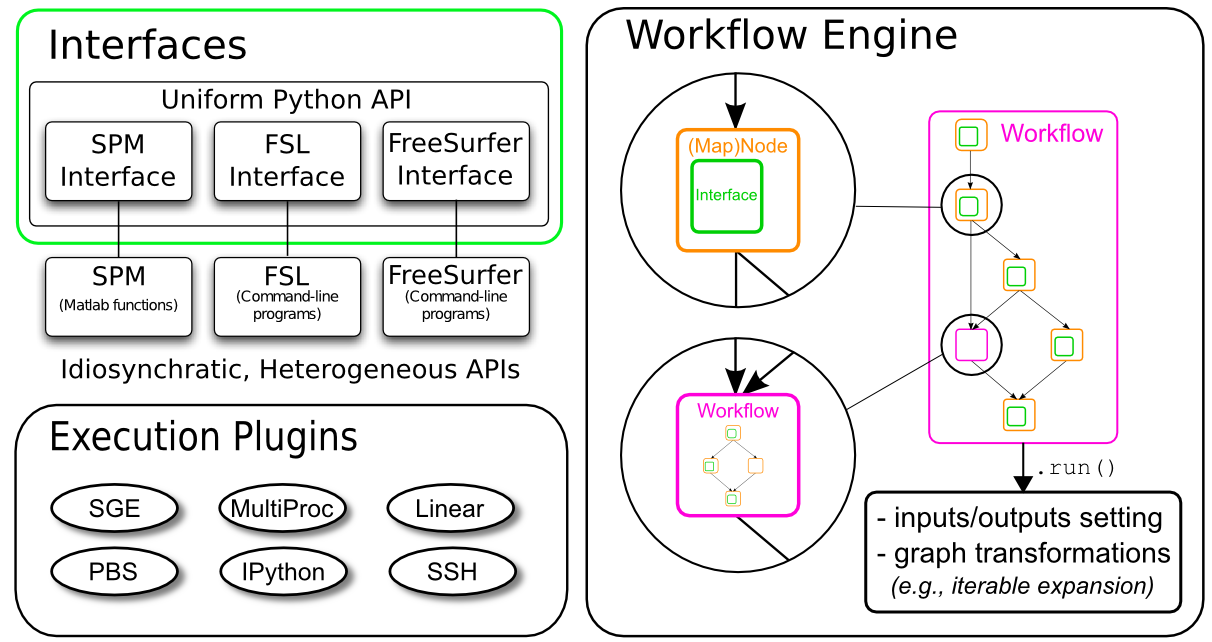
Interfaces: Wraps a program/ function
Workflow engine:
Nodes: Wraps an interface for use in a workflow
Workflows: A directed graph or forest of graphs whose edges represent data flow
Data Input: Many different modules to grab/ select data depending on the data structure
Data Output: Different modules to handle data stream output
Plugin: A component that describes how a Workflow should be executed
Preparation: Download of opensource data, installations and imports
# Download 2 subjects of the Flanker Dataset
PATTERN = "sub-0[1-2]"

!datalad install https://github.com/OpenNeuroDatasets/ds000102.git
!cd ds000102 && datalad get $PATTERN
Cloning: 0%| | 0.00/2.00 [00:00<?, ? candidates/s]
Enumerating: 0.00 Objects [00:00, ? Objects/s]
Counting: 0%| | 0.00/27.0 [00:00<?, ? Objects/s]
Compressing: 0%| | 0.00/23.0 [00:00<?, ? Objects/s]
Receiving: 0%| | 0.00/2.15k [00:00<?, ? Objects/s]
Receiving: 58%|███████████ | 1.25k/2.15k [00:00<00:00, 7.30k Objects/s]
Resolving: 0%| | 0.00/537 [00:00<?, ? Deltas/s]
[INFO ] Remote origin not usable by git-annex; setting annex-ignore
[INFO ] https://github.com/OpenNeuroDatasets/ds000102.git/config download failed: Not Found
[INFO ] access to 1 dataset sibling s3-PRIVATE not auto-enabled, enable with:
| datalad siblings -d "/home/jovyan/workspace/books/examples/workflows/ds000102" enable -s s3-PRIVATE
install(ok): /home/jovyan/workspace/books/examples/workflows/ds000102 (dataset)
Total: 0%| | 0.00/136M [00:00<?, ? Bytes/s]
Total: 0%| | 16.4k/136M [00:00<?, ? Bytes/s]
Get sub-01/a .. 1_T1w.nii.gz: 0%| | 33.3k/10.6M [00:00<02:02, 86.3k Bytes/s]
Get sub-01/a .. 1_T1w.nii.gz: 1%| | 68.2k/10.6M [00:00<01:15, 139k Bytes/s]
Total: 0%| | 138k/136M [00:01<29:18, 77.2k Bytes/s]
Get sub-01/a .. 1_T1w.nii.gz: 3%| | 295k/10.6M [00:00<00:22, 457k Bytes/s]
Get sub-01/a .. 1_T1w.nii.gz: 6%|▏ | 625k/10.6M [00:00<00:11, 893k Bytes/s]
Total: 1%|▏ | 1.25M/136M [00:02<03:56, 570k Bytes/s]
Get sub-01/a .. 1_T1w.nii.gz: 24%|▍ | 2.52M/10.6M [00:01<00:02, 3.20M Bytes/s]
Get sub-01/a .. 1_T1w.nii.gz: 37%|▋ | 3.96M/10.6M [00:01<00:01, 4.70M Bytes/s]
Total: 4%|█ | 5.50M/136M [00:02<01:05, 1.98M Bytes/s]
Get sub-01/a .. 1_T1w.nii.gz: 64%|█▎| 6.81M/10.6M [00:01<00:00, 5.79M Bytes/s]
Get sub-01/a .. 1_T1w.nii.gz: 80%|█▌| 8.46M/10.6M [00:02<00:00, 6.56M Bytes/s]
Get sub-01/a .. 1_T1w.nii.gz: 91%|█▊| 9.64M/10.6M [00:02<00:00, 6.38M Bytes/s]
Get sub-01/a .. 1_T1w.nii.gz: 100%|██████████| 10.6M/10.6M [00:00<?, ? Bytes/s]
Total: 8%|██ | 10.6M/136M [00:03<00:40, 3.07M Bytes/s]
Get sub-01/f .. _bold.nii.gz: 0%| | 16.4k/28.1M [00:00<?, ? Bytes/s]
Get sub-01/f .. _bold.nii.gz: 7%|▏ | 1.90M/28.1M [00:00<00:02, 12.7M Bytes/s]
Get sub-01/f .. _bold.nii.gz: 12%|▏ | 3.37M/28.1M [00:00<00:01, 13.7M Bytes/s]
Get sub-01/f .. _bold.nii.gz: 18%|▎ | 5.01M/28.1M [00:00<00:03, 7.34M Bytes/s]
Total: 13%|███▎ | 17.2M/136M [00:04<00:31, 3.74M Bytes/s]
Get sub-01/f .. _bold.nii.gz: 29%|▌ | 8.13M/28.1M [00:00<00:02, 7.65M Bytes/s]
Get sub-01/f .. _bold.nii.gz: 35%|▋ | 9.77M/28.1M [00:01<00:02, 8.40M Bytes/s]
Get sub-01/f .. _bold.nii.gz: 41%|▊ | 11.4M/28.1M [00:01<00:02, 7.86M Bytes/s]
Get sub-01/f .. _bold.nii.gz: 46%|▉ | 13.0M/28.1M [00:01<00:01, 7.97M Bytes/s]
Get sub-01/f .. _bold.nii.gz: 52%|█ | 14.7M/28.1M [00:01<00:01, 8.02M Bytes/s]
Total: 20%|█████▏ | 27.1M/136M [00:05<00:23, 4.69M Bytes/s]
Get sub-01/f .. _bold.nii.gz: 65%|█▎| 18.3M/28.1M [00:02<00:01, 9.01M Bytes/s]
Get sub-01/f .. _bold.nii.gz: 72%|█▍| 20.1M/28.1M [00:02<00:00, 10.7M Bytes/s]
Get sub-01/f .. _bold.nii.gz: 78%|█▌| 22.0M/28.1M [00:02<00:00, 8.41M Bytes/s]
Get sub-01/f .. _bold.nii.gz: 85%|█▋| 23.8M/28.1M [00:02<00:00, 9.83M Bytes/s]
Get sub-01/f .. _bold.nii.gz: 92%|█▊| 25.8M/28.1M [00:02<00:00, 9.88M Bytes/s]
Total: 28%|███████▎ | 38.2M/136M [00:06<00:17, 5.50M Bytes/s]
Get sub-01/f .. _bold.nii.gz: 100%|██████████| 28.1M/28.1M [00:00<?, ? Bytes/s]
Get sub-01/f .. _bold.nii.gz: 0%| | 16.4k/28.1M [00:00<?, ? Bytes/s]
Get sub-01/f .. _bold.nii.gz: 7%|▏ | 1.92M/28.1M [00:00<00:02, 9.66M Bytes/s]
Get sub-01/f .. _bold.nii.gz: 11%|▏ | 3.17M/28.1M [00:00<00:03, 7.68M Bytes/s]
Get sub-01/f .. _bold.nii.gz: 17%|▎ | 4.70M/28.1M [00:00<00:03, 7.71M Bytes/s]
Get sub-01/f .. _bold.nii.gz: 22%|▍ | 6.14M/28.1M [00:00<00:02, 9.09M Bytes/s]
Get sub-01/f .. _bold.nii.gz: 27%|▌ | 7.59M/28.1M [00:00<00:02, 7.12M Bytes/s]
Get sub-01/f .. _bold.nii.gz: 32%|▋ | 9.05M/28.1M [00:01<00:02, 7.16M Bytes/s]
Get sub-01/f .. _bold.nii.gz: 37%|▋ | 10.5M/28.1M [00:01<00:02, 7.14M Bytes/s]
Get sub-01/f .. _bold.nii.gz: 42%|▊ | 11.9M/28.1M [00:01<00:02, 7.23M Bytes/s]
Total: 38%|█████████▉ | 51.9M/136M [00:09<00:14, 5.61M Bytes/s]
Get sub-01/f .. _bold.nii.gz: 52%|█ | 14.6M/28.1M [00:01<00:02, 6.70M Bytes/s]
Get sub-01/f .. _bold.nii.gz: 57%|█▏| 16.1M/28.1M [00:02<00:01, 6.97M Bytes/s]
Get sub-01/f .. _bold.nii.gz: 63%|█▎| 17.6M/28.1M [00:02<00:01, 7.15M Bytes/s]
Get sub-01/f .. _bold.nii.gz: 67%|█▎| 18.8M/28.1M [00:02<00:01, 6.86M Bytes/s]
Get sub-01/f .. _bold.nii.gz: 72%|█▍| 20.4M/28.1M [00:02<00:00, 8.01M Bytes/s]
Get sub-01/f .. _bold.nii.gz: 78%|█▌| 21.9M/28.1M [00:02<00:00, 6.96M Bytes/s]
Get sub-01/f .. _bold.nii.gz: 82%|█▋| 23.1M/28.1M [00:03<00:00, 6.74M Bytes/s]
Get sub-01/f .. _bold.nii.gz: 88%|█▊| 24.6M/28.1M [00:03<00:00, 7.08M Bytes/s]
Get sub-01/f .. _bold.nii.gz: 92%|█▊| 25.8M/28.1M [00:03<00:00, 6.74M Bytes/s]
Get sub-01/f .. _bold.nii.gz: 97%|█▉| 27.4M/28.1M [00:03<00:00, 7.81M Bytes/s]
Get sub-01/f .. _bold.nii.gz: 100%|██████████| 28.1M/28.1M [00:00<?, ? Bytes/s]
Total: 49%|████████████▊ | 66.8M/136M [00:11<00:11, 5.86M Bytes/s]
Get sub-02/a .. 2_T1w.nii.gz: 0%| | 16.4k/10.7M [00:00<?, ? Bytes/s]
Get sub-02/a .. 2_T1w.nii.gz: 18%|▎ | 1.92M/10.7M [00:00<00:00, 9.63M Bytes/s]
Get sub-02/a .. 2_T1w.nii.gz: 28%|▌ | 2.96M/10.7M [00:00<00:01, 7.06M Bytes/s]
Get sub-02/a .. 2_T1w.nii.gz: 43%|▊ | 4.63M/10.7M [00:00<00:00, 7.66M Bytes/s]
Get sub-02/a .. 2_T1w.nii.gz: 54%|█ | 5.76M/10.7M [00:00<00:00, 8.55M Bytes/s]
Get sub-02/a .. 2_T1w.nii.gz: 68%|█▎| 7.35M/10.7M [00:00<00:00, 6.91M Bytes/s]
Get sub-02/a .. 2_T1w.nii.gz: 82%|█▋| 8.82M/10.7M [00:01<00:00, 7.07M Bytes/s]
Get sub-02/a .. 2_T1w.nii.gz: 96%|█▉| 10.3M/10.7M [00:01<00:00, 7.23M Bytes/s]
Get sub-02/a .. 2_T1w.nii.gz: 100%|██████████| 10.7M/10.7M [00:00<?, ? Bytes/s]
Get sub-02/f .. _bold.nii.gz: 0%| | 16.4k/29.2M [00:00<?, ? Bytes/s]
Get sub-02/f .. _bold.nii.gz: 7%|▏ | 1.92M/29.2M [00:00<00:02, 9.71M Bytes/s]
Get sub-02/f .. _bold.nii.gz: 11%|▏ | 3.29M/29.2M [00:00<00:03, 8.06M Bytes/s]
Total: 61%|███████████████▋ | 82.3M/136M [00:14<00:09, 5.86M Bytes/s]
Get sub-02/f .. _bold.nii.gz: 22%|▍ | 6.33M/29.2M [00:00<00:02, 7.81M Bytes/s]
Get sub-02/f .. _bold.nii.gz: 27%|▌ | 7.79M/29.2M [00:00<00:02, 7.70M Bytes/s]
Get sub-02/f .. _bold.nii.gz: 32%|▋ | 9.38M/29.2M [00:01<00:02, 7.82M Bytes/s]
Get sub-02/f .. _bold.nii.gz: 36%|▋ | 10.6M/29.2M [00:01<00:02, 7.36M Bytes/s]
Get sub-02/f .. _bold.nii.gz: 42%|▊ | 12.3M/29.2M [00:01<00:02, 7.66M Bytes/s]
Get sub-02/f .. _bold.nii.gz: 47%|▉ | 13.8M/29.2M [00:01<00:01, 8.83M Bytes/s]
Get sub-02/f .. _bold.nii.gz: 52%|█ | 15.1M/29.2M [00:01<00:01, 7.05M Bytes/s]
Get sub-02/f .. _bold.nii.gz: 57%|█▏| 16.7M/29.2M [00:02<00:01, 7.37M Bytes/s]
Get sub-02/f .. _bold.nii.gz: 62%|█▏| 18.2M/29.2M [00:02<00:01, 7.33M Bytes/s]
Get sub-02/f .. _bold.nii.gz: 67%|█▎| 19.7M/29.2M [00:02<00:01, 7.36M Bytes/s]
Get sub-02/f .. _bold.nii.gz: 72%|█▍| 20.9M/29.2M [00:02<00:01, 7.98M Bytes/s]
Total: 74%|███████████████████▊ | 100M/136M [00:16<00:05, 6.09M Bytes/s]
Get sub-02/f .. _bold.nii.gz: 82%|█▋| 23.9M/29.2M [00:03<00:00, 7.08M Bytes/s]
Get sub-02/f .. _bold.nii.gz: 87%|█▋| 25.5M/29.2M [00:03<00:00, 7.33M Bytes/s]
Get sub-02/f .. _bold.nii.gz: 92%|█▊| 26.7M/29.2M [00:03<00:00, 6.95M Bytes/s]
Get sub-02/f .. _bold.nii.gz: 97%|█▉| 28.3M/29.2M [00:03<00:00, 8.25M Bytes/s]
Get sub-02/f .. _bold.nii.gz: 100%|██████████| 29.2M/29.2M [00:00<?, ? Bytes/s]
Get sub-02/f .. _bold.nii.gz: 0%| | 16.4k/29.2M [00:00<?, ? Bytes/s]
Get sub-02/f .. _bold.nii.gz: 7%|▏ | 1.91M/29.2M [00:00<00:02, 12.9M Bytes/s]
Get sub-02/f .. _bold.nii.gz: 11%|▏ | 3.20M/29.2M [00:00<00:03, 7.46M Bytes/s]
Get sub-02/f .. _bold.nii.gz: 16%|▎ | 4.78M/29.2M [00:00<00:03, 7.65M Bytes/s]
Get sub-02/f .. _bold.nii.gz: 22%|▍ | 6.43M/29.2M [00:00<00:02, 7.89M Bytes/s]
Get sub-02/f .. _bold.nii.gz: 27%|▌ | 7.81M/29.2M [00:00<00:02, 7.55M Bytes/s]
Get sub-02/f .. _bold.nii.gz: 32%|▋ | 9.47M/29.2M [00:01<00:02, 8.44M Bytes/s]
Get sub-02/f .. _bold.nii.gz: 37%|▋ | 10.9M/29.2M [00:01<00:02, 7.53M Bytes/s]
Get sub-02/f .. _bold.nii.gz: 43%|▊ | 12.5M/29.2M [00:01<00:02, 7.62M Bytes/s]
Total: 89%|███████████████████████▉ | 121M/136M [00:19<00:02, 6.21M Bytes/s]
Get sub-02/f .. _bold.nii.gz: 54%|█ | 15.7M/29.2M [00:01<00:01, 7.79M Bytes/s]
Get sub-02/f .. _bold.nii.gz: 59%|█▏| 17.2M/29.2M [00:02<00:01, 8.24M Bytes/s]
Get sub-02/f .. _bold.nii.gz: 64%|█▎| 18.7M/29.2M [00:02<00:01, 7.57M Bytes/s]
Get sub-02/f .. _bold.nii.gz: 70%|█▍| 20.3M/29.2M [00:02<00:01, 7.71M Bytes/s]
Get sub-02/f .. _bold.nii.gz: 75%|█▍| 21.8M/29.2M [00:02<00:00, 7.61M Bytes/s]
Get sub-02/f .. _bold.nii.gz: 80%|█▌| 23.3M/29.2M [00:02<00:00, 7.59M Bytes/s]
Get sub-02/f .. _bold.nii.gz: 85%|█▋| 24.8M/29.2M [00:03<00:00, 7.96M Bytes/s]
Get sub-02/f .. _bold.nii.gz: 90%|█▊| 26.3M/29.2M [00:03<00:00, 7.39M Bytes/s]
Get sub-02/f .. _bold.nii.gz: 95%|█▉| 27.7M/29.2M [00:03<00:00, 7.45M Bytes/s]
Get sub-02/f .. _bold.nii.gz: 100%|█▉| 29.2M/29.2M [00:03<00:00, 7.32M Bytes/s]
Get sub-02/f .. _bold.nii.gz: 100%|██████████| 29.2M/29.2M [00:00<?, ? Bytes/s]
get(ok): sub-01/anat/sub-01_T1w.nii.gz (file) [from s3-PUBLIC...]
get(ok): sub-01/func/sub-01_task-flanker_run-1_bold.nii.gz (file) [from s3-PUBLIC...]
get(ok): sub-01/func/sub-01_task-flanker_run-2_bold.nii.gz (file) [from s3-PUBLIC...]
get(ok): sub-02/anat/sub-02_T1w.nii.gz (file) [from s3-PUBLIC...]
get(ok): sub-02/func/sub-02_task-flanker_run-1_bold.nii.gz (file) [from s3-PUBLIC...]
get(ok): sub-02/func/sub-02_task-flanker_run-2_bold.nii.gz (file) [from s3-PUBLIC...]
get(ok): sub-01 (directory)
get(ok): sub-02 (directory)
action summary:
get (ok: 8)
%%capture
! pip install nilearn==0.13.1 nibabel==5.3.3
from nipype import Node, Workflow, DataGrabber, DataSink
from nipype.interfaces.utility import IdentityInterface
from nipype.interfaces import fsl
from nilearn import plotting
from IPython.display import Image
import os
from os.path import join as opj
import matplotlib.pyplot as plt
import numpy as np
import nibabel as nib
# Create directory for all the outputs (if it doesn't exist yet)
! [ ! -d output ] && mkdir output3.1. Interfaces : The core pieces of Nipype
Python wrapper around a particular piece of software (even if it is written in another programming language than python):
- FSL
- AFNI
- ANTS
- FreeSurfer
- SPM
- dcm2nii
- Nipy
- MNE
- DIPY
- ...
Such an interface knows what sort of options an external program has and how to execute it (e.g., keeps track of the inputs and outputs, and checks their expected types).
In the Nipype framework we can get an information page on an interface class by using the help() function.
Example: Interface for FSL’s Brain Extraction Tool BET
# help() function to get a general explanation of the class as well as a list of possible (mandatory and optional) input and output parameters
fsl.BET.help()
Wraps the executable command ``bet``.
FSL BET wrapper for skull stripping
For complete details, see the `BET Documentation.
<https://fsl.fmrib.ox.ac.uk/fsl/fslwiki/BET/UserGuide>`_
Examples
--------
>>> from nipype.interfaces import fsl
>>> btr = fsl.BET()
>>> btr.inputs.in_file = 'structural.nii'
>>> btr.inputs.frac = 0.7
>>> btr.inputs.out_file = 'brain_anat.nii'
>>> btr.cmdline
'bet structural.nii brain_anat.nii -f 0.70'
>>> res = btr.run() # doctest: +SKIP
Inputs::
[Mandatory]
in_file: (a pathlike object or string representing an existing file)
input file to skull strip
argument: ``%s``, position: 0
[Optional]
out_file: (a pathlike object or string representing a file)
name of output skull stripped image
argument: ``%s``, position: 1
outline: (a boolean)
create surface outline image
argument: ``-o``
mask: (a boolean)
create binary mask image
argument: ``-m``
skull: (a boolean)
create skull image
argument: ``-s``
no_output: (a boolean)
Don't generate segmented output
argument: ``-n``
frac: (a float)
fractional intensity threshold
argument: ``-f %.2f``
vertical_gradient: (a float)
vertical gradient in fractional intensity threshold (-1, 1)
argument: ``-g %.2f``
radius: (an integer)
head radius
argument: ``-r %d``
center: (a list of at most 3 items which are an integer)
center of gravity in voxels
argument: ``-c %s``
threshold: (a boolean)
apply thresholding to segmented brain image and mask
argument: ``-t``
mesh: (a boolean)
generate a vtk mesh brain surface
argument: ``-e``
robust: (a boolean)
robust brain centre estimation (iterates BET several times)
argument: ``-R``
mutually_exclusive: functional, reduce_bias, robust, padding,
remove_eyes, surfaces, t2_guided
padding: (a boolean)
improve BET if FOV is very small in Z (by temporarily padding end
slices)
argument: ``-Z``
mutually_exclusive: functional, reduce_bias, robust, padding,
remove_eyes, surfaces, t2_guided
remove_eyes: (a boolean)
eye & optic nerve cleanup (can be useful in SIENA)
argument: ``-S``
mutually_exclusive: functional, reduce_bias, robust, padding,
remove_eyes, surfaces, t2_guided
surfaces: (a boolean)
run bet2 and then betsurf to get additional skull and scalp surfaces
(includes registrations)
argument: ``-A``
mutually_exclusive: functional, reduce_bias, robust, padding,
remove_eyes, surfaces, t2_guided
t2_guided: (a pathlike object or string representing a file)
as with creating surfaces, when also feeding in non-brain-extracted
T2 (includes registrations)
argument: ``-A2 %s``
mutually_exclusive: functional, reduce_bias, robust, padding,
remove_eyes, surfaces, t2_guided
functional: (a boolean)
apply to 4D fMRI data
argument: ``-F``
mutually_exclusive: functional, reduce_bias, robust, padding,
remove_eyes, surfaces, t2_guided
reduce_bias: (a boolean)
bias field and neck cleanup
argument: ``-B``
mutually_exclusive: functional, reduce_bias, robust, padding,
remove_eyes, surfaces, t2_guided
output_type: ('NIFTI' or 'NIFTI_PAIR' or 'NIFTI_GZ' or
'NIFTI_PAIR_GZ' or 'GIFTI')
FSL output type
args: (a string)
Additional parameters to the command
argument: ``%s``
environ: (a dictionary with keys which are a bytes or None or a value
of class 'str' and with values which are a bytes or None or a
value of class 'str', nipype default value: {})
Environment variables
Outputs::
out_file: (a pathlike object or string representing a file)
path/name of skullstripped file (if generated)
mask_file: (a pathlike object or string representing a file)
path/name of binary brain mask (if generated)
outline_file: (a pathlike object or string representing a file)
path/name of outline file (if generated)
meshfile: (a pathlike object or string representing a file)
path/name of vtk mesh file (if generated)
inskull_mask_file: (a pathlike object or string representing a file)
path/name of inskull mask (if generated)
inskull_mesh_file: (a pathlike object or string representing a file)
path/name of inskull mesh outline (if generated)
outskull_mask_file: (a pathlike object or string representing a file)
path/name of outskull mask (if generated)
outskull_mesh_file: (a pathlike object or string representing a file)
path/name of outskull mesh outline (if generated)
outskin_mask_file: (a pathlike object or string representing a file)
path/name of outskin mask (if generated)
outskin_mesh_file: (a pathlike object or string representing a file)
path/name of outskin mesh outline (if generated)
skull_mask_file: (a pathlike object or string representing a file)
path/name of skull mask (if generated)
skull_file: (a pathlike object or string representing a file)
path/name of skull file (if generated)
References:
-----------
None
# Create an instance of the fsl.BET object
skullstrip = fsl.BET()

# Set input (and output)
skullstrip.inputs.in_file = './ds000102/sub-01/anat/sub-01_T1w.nii.gz'

skullstrip.inputs.out_file = './output/T1w_nipype_bet.nii.gz' # Interfaces by default spit out results to the local directory why relative paths work (outputs are not stored in temporary files like in Nodes/Workflow)
# Execute the node and shows outputs
res = skullstrip.run()
res.outputs
inskull_mask_file = <undefined>
inskull_mesh_file = <undefined>
mask_file = <undefined>
meshfile = <undefined>
out_file = /home/jovyan/workspace/books/examples/workflows/output/T1w_nipype_bet.nii.gz
outline_file = <undefined>
outskin_mask_file = <undefined>
outskin_mesh_file = <undefined>
outskull_mask_file = <undefined>
outskull_mesh_file = <undefined>
skull_file = <undefined>
skull_mask_file = <undefined>
# Gives you transparency to what's happening under the hood with one additional line
skullstrip.cmdline'bet ds000102/sub-01/anat/sub-01_T1w.nii.gz output/T1w_nipype_bet.nii.gz'3.2. Nodes: The light wrapper around interfaces
To streamline the analysis and to execute multiple interfaces in a sensible order, they need to be put in a Node.
A node is an object that executes a certain function: Nipype interface, a user-specified function or an external script.
Each node consists of a name, an interface category and at least one input field, and at least one output field.
Nodes expose inputs and outputs of the Interface as its own and add additional functionality allowing to connect Nodes into a Workflow (directed graph):
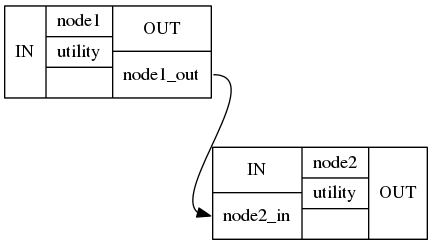
Figure 3: Nipype Nodes
MapNode
Quite similar to a normal Node, but it can take a list of inputs and operate over each input separately, ultimately returning a list of outputs.
Example: Multiple functional images (A) and each of them should be motion corrected (B1, B2, B3,..). Afterwards, put them all together into a GLM, i.e. the input for the GLM should be an array of [B1, B2, B3, ...].
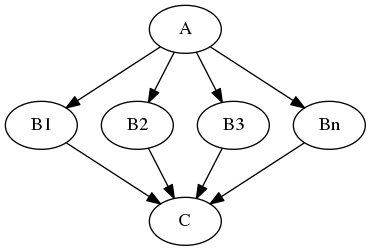
Figure 4: MapNode
Iterables
For repetitive steps: Iterables split up the execution workflow into many different branches.
Example: Running the same preprocessing on multiple subjects or doing statistical inference on multiple files.
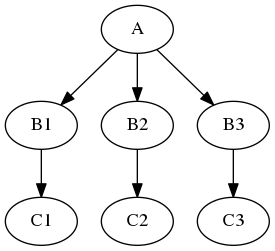
Figure 5: Iterables
JoinNode
Has the opposite effect of iterables: JoinNode merges the different branches back into one node.
A JoinNode generalizes MapNode to operate in conjunction with an upstream iterable node to reassemble downstream results, e.g., to merge files into a group level analysis.
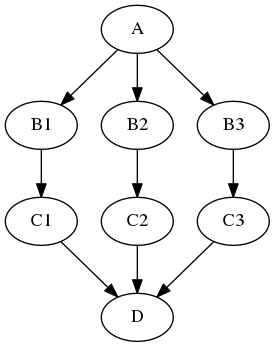
Figure 6: JoinNode
Example: Node
nipype.pipeline.engine.nodes module

nodename = Nodetype(interface_function(), name='labelname')
nodename: Variable name of the node in the python environment.
Nodetype: Type of node: Node, MapNode or JoinNode.
interface_function: Function the node should execute. Can be user specific or coming from an Interface.
labelname: Label name of the node in the workflow environment (defines the name of the working directory).
To execute a node, apply the
.run()methodTo return the output fields of the underlying interface, use
.outputsTo get help,
.help()prints the interface help
The specification of base_dir is very important (and is why we needed to use absolute paths above) because otherwise all the outputs would be saved somewhere in the temporary files. Unlike interfaces, which by default spit out results to the local directly, the Workflow engine executes things off in its own directory hierarchy.
# Create FSL BET Node with fractional intensity threshold of 0.3 and create a binary mask image

# For reasons that will become clear in the Workflow section, it's important to pass filenames to Nodes as absolute paths.
input_file = opj(os.getcwd(), 'ds000102/sub-01/anat/sub-01_T1w.nii.gz')
output_file = opj(os.getcwd(), 'output/T1w_nipype_bet.nii.gz')

# Create FSL BET Node with fractional intensity threshold of 0.3 and create a binary mask image
bet = Node(fsl.BET(), name='bet_node')

# Define inputs
bet.inputs.frac = 0.3
bet.inputs.mask = True
bet.inputs.in_file = input_file
bet.inputs.out_file = output_file

# Run the node
res = bet.run()
261005-14:44:55,695 nipype.workflow INFO:
[Node] Setting-up "bet_node" in "/tmp/tmp8q8go539/bet_node".
261005-14:44:55,698 nipype.workflow INFO:
[Node] Executing "bet_node" <nipype.interfaces.fsl.preprocess.BET>
261005-14:44:58,984 nipype.workflow INFO:
[Node] Finished "bet_node", elapsed time 3.28431s.
# Shows produced outputs
res.outputs
inskull_mask_file = <undefined>
inskull_mesh_file = <undefined>
mask_file = /home/jovyan/workspace/books/examples/workflows/output/T1w_nipype_bet_mask.nii.gz
meshfile = <undefined>
out_file = /home/jovyan/workspace/books/examples/workflows/output/T1w_nipype_bet.nii.gz
outline_file = <undefined>
outskin_mask_file = <undefined>
outskin_mesh_file = <undefined>
outskull_mask_file = <undefined>
outskull_mesh_file = <undefined>
skull_file = <undefined>
skull_mask_file = <undefined>
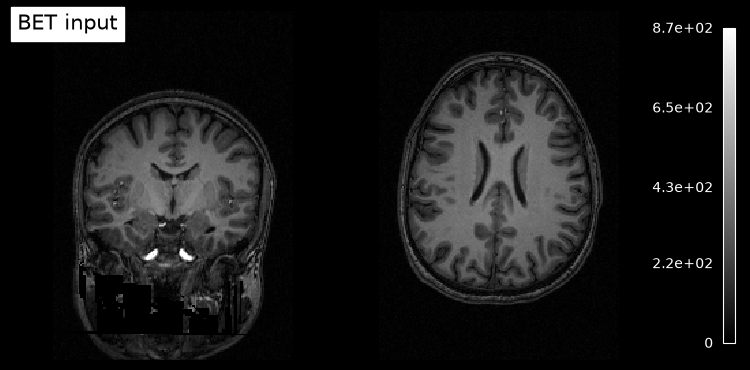
# Plot original input file
plotting.plot_anat(input_file, title='BET input', cut_coords=(10,10,10),
display_mode='ortho', dim=-1, draw_cross=False, annotate=False);
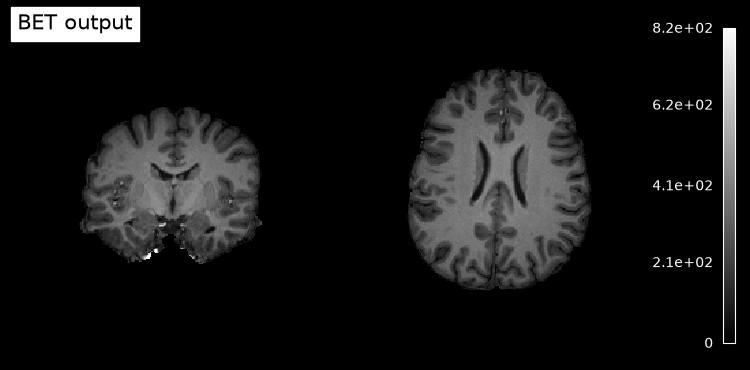
# Plot skullstripped output file (out_file) through the outputs property
plotting.plot_anat(res.outputs.out_file, title='BET output', cut_coords=(10,10,10),
display_mode='ortho', dim=-1, draw_cross=False, annotate=False);/tmp/ipykernel_2076/101719549.py:2: UserWarning: Some of the specified cut_coords seem to be out of the image bounds:
x: [-172.83, 2.17]
y: [-128.95, 126.05]
z: [-127.50, 127.50]
plotting.plot_anat(input_file, title='BET input', cut_coords=(10,10,10),
/tmp/ipykernel_2076/101719549.py:6: UserWarning: Some of the specified cut_coords seem to be out of the image bounds:
x: [-172.83, 2.17]
y: [-128.95, 126.05]
z: [-127.50, 127.50]
plotting.plot_anat(res.outputs.out_file, title='BET output', cut_coords=(10,10,10),
3.3. Workflows
Define functionality for pipelined execution of interfaces
Consist of multiple nodes, each representing a specific interface.
The processing stream is encoded as a directed acyclic graph (DAG), where each stage of processing is a node. Nodes are unidirectionally dependent on others, ensuring no cycles and clear directionality. The Node and Workflow classes make these relationships explicit.
Edges represent the data flow between nodes.
Control the setup and the execution of individual interfaces.
Will take care of inputs and outputs of each interface and arrange the execution of each interface in the most efficient way.
nipype.pipeline.engine.workflows module

Workflow(name, base_dir=None)
name: Label name of the workflow.
base_dir: Defines the working directory for this instance of workflow element. Unlike interfaces, which by default store results in the local directory, the Workflow engine executes things off in its own directory hierarchy. By default (if not set manually), it is a temporary directory (/tmp).
Workflow methods that we will use during this tutorial:
Workflow.connect(): Connect nodes in the pipelineWorkflow.write_graph(): Generates a graphviz dot file and a png fileWorkflow.run(): Execute the workflow
Example: Workflow
First, define different nodes to:
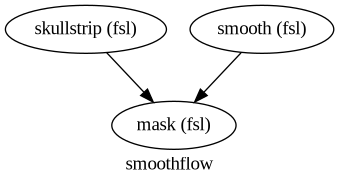
Skullstrip an image to obtain a mask
Smooth the original image
Mask the smoothed image
in_file = input_file # See node example

# Skullstrip process
skullstrip = Node(fsl.BET(in_file=in_file, mask=True), name="skullstrip")

# Smooth process
smooth = Node(fsl.IsotropicSmooth(in_file=in_file, fwhm=4), name="smooth")

# Mask process
mask = Node(fsl.ApplyMask(), name="mask")
# Create a working directory for all workflows created during this workshop
! [ ! -d output/working_dir ] && mkdir output/working_dir
wf_work_dir = opj(os.getcwd(), 'output/working_dir')
# Initiation of a workflow with specifying the working directory.
# This specification of base_dir is very important (and is why we needed to use absolute paths above for the input files) because otherwise all the outputs would be saved somewhere in the temporary files.
wf = Workflow(name="smoothflow", base_dir=wf_work_dir )Connect nodes within a workflow
method called
connectthat is going to do most of the workchecks if inputs and outputs are actually provided by the nodes that are being connected
There are two different ways to call connect:
Establish one connection at a time:
wf.connect(source, "source_output", dest, "dest_input") Establish multiple connections between two nodes at once:
wf.connect([(source, dest, [("source_output1", "dest_input1"),
                         ("source_output2", "dest_input2")
                         ])
         ])
# Option 1: connect the binary mask of the skullstripping process to the mask node
wf.connect(skullstrip, "mask_file", mask, "mask_file")
# Option 2: connect the output of the smoothing node to the input of the masking node
wf.connect([(smooth, mask, [("out_file", "in_file")])])# Explore the workflow visually
wf.write_graph(dotfilename="workflow_graph.dot")
Image(filename=opj(wf_work_dir,"smoothflow/workflow_graph.png"))261005-14:45:00,517 nipype.workflow INFO:
Generated workflow graph: /home/jovyan/workspace/books/examples/workflows/output/working_dir/smoothflow/workflow_graph.png (graph2use=hierarchical, simple_form=True).
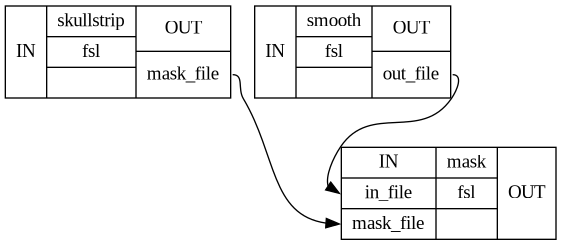
# Certain graph types also allow you to further inspect the individual connections between the nodes
wf.write_graph(graph2use='flat')

Image(filename=opj(wf_work_dir,"smoothflow/graph_detailed.png"))
261005-14:45:00,845 nipype.workflow INFO:
Generated workflow graph: /home/jovyan/workspace/books/examples/workflows/output/working_dir/smoothflow/graph.png (graph2use=flat, simple_form=True).
# Execute the workflow (running serially here)
wf.run()
261005-14:45:00,860 nipype.workflow INFO:
Workflow smoothflow settings: ['check', 'execution', 'logging', 'monitoring']
261005-14:45:00,863 nipype.workflow INFO:
Running serially.
261005-14:45:00,863 nipype.workflow INFO:
[Node] Setting-up "smoothflow.skullstrip" in "/home/jovyan/workspace/books/examples/workflows/output/working_dir/smoothflow/skullstrip".
261005-14:45:00,866 nipype.workflow INFO:
[Node] Executing "skullstrip" <nipype.interfaces.fsl.preprocess.BET>
261005-14:45:04,143 nipype.workflow INFO:
[Node] Finished "skullstrip", elapsed time 3.275927s.
261005-14:45:04,147 nipype.workflow INFO:
[Node] Setting-up "smoothflow.smooth" in "/home/jovyan/workspace/books/examples/workflows/output/working_dir/smoothflow/smooth".
261005-14:45:04,149 nipype.workflow INFO:
[Node] Executing "smooth" <nipype.interfaces.fsl.maths.IsotropicSmooth>
261005-14:45:10,643 nipype.workflow INFO:
[Node] Finished "smooth", elapsed time 6.49272s.
261005-14:45:10,646 nipype.workflow INFO:
[Node] Setting-up "smoothflow.mask" in "/home/jovyan/workspace/books/examples/workflows/output/working_dir/smoothflow/mask".
261005-14:45:10,650 nipype.workflow INFO:
[Node] Executing "mask" <nipype.interfaces.fsl.maths.ApplyMask>
261005-14:45:11,800 nipype.workflow INFO:
[Node] Finished "mask", elapsed time 1.148293s.
<networkx.classes.digraph.DiGraph at 0x757904177ad0># Check the working directories of the workflow
!tree output/working_dir/smoothflow/ -I '*js|*json|*html|*pklz|_report'output/working_dir/smoothflow/
├── graph.dot
├── graph.png
├── graph_detailed.dot
├── graph_detailed.png
├── mask
│ ├── command.txt
│ └── sub-01_T1w_smooth_masked.nii.gz
├── skullstrip
│ ├── command.txt
│ └── sub-01_T1w_brain_mask.nii.gz
├── smooth
│ ├── command.txt
│ └── sub-01_T1w_smooth.nii.gz
├── workflow_graph.dot
└── workflow_graph.png
4 directories, 12 files
# Helper function to plot 3D NIfTI images
def plot_slice(fname):

    # Load the image
    img = nib.load(fname)
    data = img.get_fdata()

    # Cut in the middle of the brain
    cut = int(data.shape[-1]/2) + 10

    # Plot the data
    plt.imshow(np.rot90(data[..., cut]), cmap="gray")
    plt.gca().set_axis_off()
f = plt.figure(figsize=(12, 4))
for i, img in enumerate([input_file,
opj(wf_work_dir, "smoothflow/smooth/sub-01_T1w_smooth.nii.gz"),
opj(wf_work_dir, "smoothflow/skullstrip/sub-01_T1w_brain_mask.nii.gz"),
opj(wf_work_dir, "smoothflow/mask/sub-01_T1w_smooth_masked.nii.gz")]):
f.add_subplot(1, 4, i + 1)
plot_slice(img)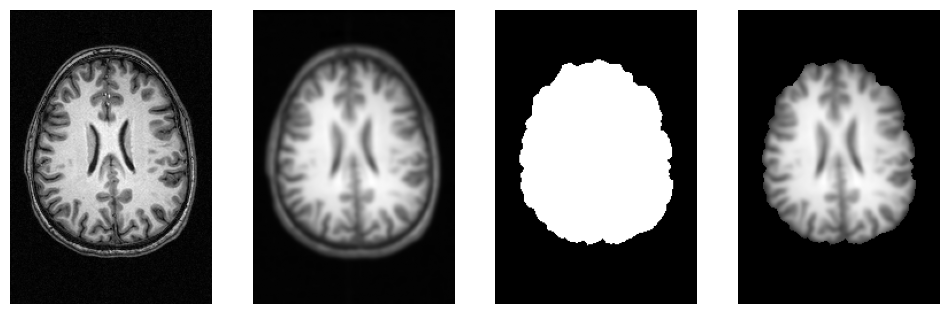
3.4. Execution Plugins: Execution on different systems
Allow seamless execution across many architectures and make using parallel computation quite easy.
Local Machines:
Serial: Runs the workflow one node at a time in a single process locally. The order of the nodes is determined by a topolocial sort of the workflow.
Multicore: Uses the Python multiprocessing library to distribute jobs as new processes on a local system.
Submission to Cluster Schedulers:
Plugins like HTCondor, PBS, SLURM, SGE, OAR, and LSF submit jobs to clusters managed by these job scheduling systems.
Advanced Cluster Integration:
DAGMan: Manages complex workflow dependencies for submission to DAGMan cluster scheduler.
IPython: Utilizes IPython parallel computing capabilities for distributed execution in clusters.
Specialized Execution Plugins:
Soma-Workflow: Integrates with Soma-Workflow system for distributed execution in HPC environments.
Cluster operation often needs a special setup.
All plugins can be executed with:
workflow.run(plugin=PLUGIN_NAME, plugin_args=ARGS_DICT)To run the workflow one node at a time:
wf.run(plugin='Linear')To distribute processing on a multicore machine, number of processors/threads will be automatically detected:
wf.run(plugin='MultiProc') Plugin arguments:
arguments = {'n_procs' : num_threads,
               'memory_gb' : num_gb}

wf.run(plugin='MultiProc', plugin_args=arguments)
In order to use Nipype with SLURM simply call:
wf.run(plugin='SLURM')Optional arguments:
template: If you want to use your own job submission template (the plugin generates a basic one by default).
sbatch_args: Takes any arguments such as nodes/partitions/gres/etc that you would want to pass on to the sbatch command underneath.
jobid_re: Regular expression for custom job submission id search.
3.5. Data Input: First step of every analysis
Nipype provides many different modules how to get the data into the framework.
We will work through an example with the DataGrabber module:
DataGrabber: Versatile input module to retrieve data from a local file system based on user-defined search criteria, including wildcard patterns, regular expressions, and directory hierarchies. It supports almost any file organization of your data.
But there are many more alternatives available:
SelectFiles: A simpler alternative to the DataGrabber interface, built on Python format strings. Format strings allow you to replace named sections of template strings set off by curly braces ({}).
BIDSDataGrabber: Get neuroimaging data organized in BIDS-compliant directory structures. It simplifies the process of accessing and organizing neuroimaging data for analysis pipelines.
DataFinder: Search for paths that match a given regular expression. Allows a less proscriptive approach to gathering input files compared to DataGrabber.
FreeSurferSource: Specific case of a file grabber that facilitates the data import of outputs from the FreeSurfer recon-all algorithm.
JSONFileGrabber: Datagrabber interface that loads a json file and generates an output for every first-level object.
S3DataGrabber: Pull data from an Amazon S3 Bucket.
SSHDataGrabber: Extension of DataGrabber module that downloads the file list and optionally the files from a SSH server.
XNATSource: Pull data from an XNAT server.
Example: DataGrabber
Let’s assume we want to grab the anatomical and functional images of certain subjects of the Flanker dataset:
!tree -L 4 ds000102/ -I '*csv|*pdf'ds000102/
├── CHANGES
├── README
├── T1w.json
├── dataset_description.json
├── derivatives
│ └── mriqc
├── participants.tsv
├── sub-01
│ ├── anat
│ │ └── sub-01_T1w.nii.gz -> ../../.git/annex/objects/Pf/6k/MD5E-s10581116--757e697a01eeea5c97a7d6fbc7153373.nii.gz/MD5E-s10581116--757e697a01eeea5c97a7d6fbc7153373.nii.gz
│ └── func
│ ├── sub-01_task-flanker_run-1_bold.nii.gz -> ../../.git/annex/objects/5m/w9/MD5E-s28061534--8e8c44ff53f9b5d46f2caae5916fa4ef.nii.gz/MD5E-s28061534--8e8c44ff53f9b5d46f2caae5916fa4ef.nii.gz
│ ├── sub-01_task-flanker_run-1_events.tsv
│ ├── sub-01_task-flanker_run-2_bold.nii.gz -> ../../.git/annex/objects/2F/58/MD5E-s28143286--f0bcf782c3688e2cf7149b4665949484.nii.gz/MD5E-s28143286--f0bcf782c3688e2cf7149b4665949484.nii.gz
│ └── sub-01_task-flanker_run-2_events.tsv
├── sub-02
│ ├── anat
│ │ └── sub-02_T1w.nii.gz -> ../../.git/annex/objects/3m/FF/MD5E-s10737123--cbd4181ee26559e8ec0a441fa2f834a7.nii.gz/MD5E-s10737123--cbd4181ee26559e8ec0a441fa2f834a7.nii.gz
│ └── func
│ ├── sub-02_task-flanker_run-1_bold.nii.gz -> ../../.git/annex/objects/8v/2j/MD5E-s29188378--80050f0deb13562c24f2fc23f8d095bd.nii.gz/MD5E-s29188378--80050f0deb13562c24f2fc23f8d095bd.nii.gz
│ ├── sub-02_task-flanker_run-1_events.tsv
│ ├── sub-02_task-flanker_run-2_bold.nii.gz -> ../../.git/annex/objects/fM/Kw/MD5E-s29193540--cc013f2d7d148b448edca8aada349d02.nii.gz/MD5E-s29193540--cc013f2d7d148b448edca8aada349d02.nii.gz
│ └── sub-02_task-flanker_run-2_events.tsv
├── sub-03
│ ├── anat
│ │ └── sub-03_T1w.nii.gz -> ../../.git/annex/objects/7W/9z/MD5E-s10707026--8f1858934cc7c7457e3a4a71cc2131fc.nii.gz/MD5E-s10707026--8f1858934cc7c7457e3a4a71cc2131fc.nii.gz
│ └── func
│ ├── sub-03_task-flanker_run-1_bold.nii.gz -> ../../.git/annex/objects/q6/kF/MD5E-s28755729--b19466702eee6b9385bd6e19e362f94c.nii.gz/MD5E-s28755729--b19466702eee6b9385bd6e19e362f94c.nii.gz
│ ├── sub-03_task-flanker_run-1_events.tsv
│ ├── sub-03_task-flanker_run-2_bold.nii.gz -> ../../.git/annex/objects/zV/K1/MD5E-s28782544--8d9700a435d08c90f0c1d534efdc8b69.nii.gz/MD5E-s28782544--8d9700a435d08c90f0c1d534efdc8b69.nii.gz
│ └── sub-03_task-flanker_run-2_events.tsv
├── sub-04
│ ├── anat
│ │ └── sub-04_T1w.nii.gz -> ../../.git/annex/objects/FW/14/MD5E-s10738444--2a9a2ba4ea7d2324c84bf5a2882f196c.nii.gz/MD5E-s10738444--2a9a2ba4ea7d2324c84bf5a2882f196c.nii.gz
│ └── func
│ ├── sub-04_task-flanker_run-1_bold.nii.gz -> ../../.git/annex/objects/9Z/0Q/MD5E-s29062799--27171406951ea275cb5857ea0dc32345.nii.gz/MD5E-s29062799--27171406951ea275cb5857ea0dc32345.nii.gz
│ ├── sub-04_task-flanker_run-1_events.tsv
│ ├── sub-04_task-flanker_run-2_bold.nii.gz -> ../../.git/annex/objects/FW/FZ/MD5E-s29071279--f89b61fe3ebab26df1374f2564bd95c2.nii.gz/MD5E-s29071279--f89b61fe3ebab26df1374f2564bd95c2.nii.gz
│ └── sub-04_task-flanker_run-2_events.tsv
├── sub-05
│ ├── anat
│ │ └── sub-05_T1w.nii.gz -> ../../.git/annex/objects/k2/Kj/MD5E-s10753867--c4b5788da5f4c627f0f5862da5f46c35.nii.gz/MD5E-s10753867--c4b5788da5f4c627f0f5862da5f46c35.nii.gz
│ └── func
│ ├── sub-05_task-flanker_run-1_bold.nii.gz -> ../../.git/annex/objects/VZ/z5/MD5E-s29667270--0ce9ac78b6aa9a77fc94c655a6ff5a06.nii.gz/MD5E-s29667270--0ce9ac78b6aa9a77fc94c655a6ff5a06.nii.gz
│ ├── sub-05_task-flanker_run-1_events.tsv
│ ├── sub-05_task-flanker_run-2_bold.nii.gz -> ../../.git/annex/objects/z7/MP/MD5E-s29660544--752750dabb21e2cf28e87d1d550a71b9.nii.gz/MD5E-s29660544--752750dabb21e2cf28e87d1d550a71b9.nii.gz
│ └── sub-05_task-flanker_run-2_events.tsv
├── sub-06
│ ├── anat
│ │ └── sub-06_T1w.nii.gz -> ../../.git/annex/objects/5w/G0/MD5E-s10620585--1132eab3830fe59b8a10b6582bb49004.nii.gz/MD5E-s10620585--1132eab3830fe59b8a10b6582bb49004.nii.gz
│ └── func
│ ├── sub-06_task-flanker_run-1_bold.nii.gz -> ../../.git/annex/objects/3x/qj/MD5E-s29386982--e671c0c647ce7d0d4596e35b702ee970.nii.gz/MD5E-s29386982--e671c0c647ce7d0d4596e35b702ee970.nii.gz
│ ├── sub-06_task-flanker_run-1_events.tsv
│ ├── sub-06_task-flanker_run-2_bold.nii.gz -> ../../.git/annex/objects/9j/6P/MD5E-s29379265--e513a2746d2b5c603f96044cf48c557c.nii.gz/MD5E-s29379265--e513a2746d2b5c603f96044cf48c557c.nii.gz
│ └── sub-06_task-flanker_run-2_events.tsv
├── sub-07
│ ├── anat
│ │ └── sub-07_T1w.nii.gz -> ../../.git/annex/objects/08/fF/MD5E-s10718092--38481fbc489dfb1ec4b174b57591a074.nii.gz/MD5E-s10718092--38481fbc489dfb1ec4b174b57591a074.nii.gz
│ └── func
│ ├── sub-07_task-flanker_run-1_bold.nii.gz -> ../../.git/annex/objects/z1/7W/MD5E-s28946009--5baf7a314874b280543fc0f91f2731af.nii.gz/MD5E-s28946009--5baf7a314874b280543fc0f91f2731af.nii.gz
│ ├── sub-07_task-flanker_run-1_events.tsv
│ ├── sub-07_task-flanker_run-2_bold.nii.gz -> ../../.git/annex/objects/Jf/W7/MD5E-s28960603--682e13963bfc49cc6ae05e9ba5c62619.nii.gz/MD5E-s28960603--682e13963bfc49cc6ae05e9ba5c62619.nii.gz
│ └── sub-07_task-flanker_run-2_events.tsv
├── sub-08
│ ├── anat
│ │ └── sub-08_T1w.nii.gz -> ../../.git/annex/objects/mw/MM/MD5E-s10561256--b94dddd8dc1c146aa8cd97f8d9994146.nii.gz/MD5E-s10561256--b94dddd8dc1c146aa8cd97f8d9994146.nii.gz
│ └── func
│ ├── sub-08_task-flanker_run-1_bold.nii.gz -> ../../.git/annex/objects/zX/v9/MD5E-s28641609--47314e6d1a14b8545686110b5b67f8b8.nii.gz/MD5E-s28641609--47314e6d1a14b8545686110b5b67f8b8.nii.gz
│ ├── sub-08_task-flanker_run-1_events.tsv
│ ├── sub-08_task-flanker_run-2_bold.nii.gz -> ../../.git/annex/objects/WZ/F0/MD5E-s28636310--4535bf26281e1c5556ad0d3468e7fe4e.nii.gz/MD5E-s28636310--4535bf26281e1c5556ad0d3468e7fe4e.nii.gz
│ └── sub-08_task-flanker_run-2_events.tsv
├── sub-09
│ ├── anat
│ │ └── sub-09_T1w.nii.gz -> ../../.git/annex/objects/QJ/ZZ/MD5E-s10775967--e6a18e64bc0a6b17254a9564cf9b8f82.nii.gz/MD5E-s10775967--e6a18e64bc0a6b17254a9564cf9b8f82.nii.gz
│ └── func
│ ├── sub-09_task-flanker_run-1_bold.nii.gz -> ../../.git/annex/objects/k9/1X/MD5E-s29200533--59e86a903e0ab3d1d320c794ba1f0777.nii.gz/MD5E-s29200533--59e86a903e0ab3d1d320c794ba1f0777.nii.gz
│ ├── sub-09_task-flanker_run-1_events.tsv
│ ├── sub-09_task-flanker_run-2_bold.nii.gz -> ../../.git/annex/objects/W3/94/MD5E-s29223017--7f3fb9e260d3bd28e29b0b586ce4c344.nii.gz/MD5E-s29223017--7f3fb9e260d3bd28e29b0b586ce4c344.nii.gz
│ └── sub-09_task-flanker_run-2_events.tsv
├── sub-10
│ ├── anat
│ │ └── sub-10_T1w.nii.gz -> ../../.git/annex/objects/5F/3f/MD5E-s10750712--bde2309077bffe22cb65e42ebdce5bfa.nii.gz/MD5E-s10750712--bde2309077bffe22cb65e42ebdce5bfa.nii.gz
│ └── func
│ ├── sub-10_task-flanker_run-1_bold.nii.gz -> ../../.git/annex/objects/3p/qp/MD5E-s29732696--339715d5cec387f4d44dfe94f304a429.nii.gz/MD5E-s29732696--339715d5cec387f4d44dfe94f304a429.nii.gz
│ ├── sub-10_task-flanker_run-1_events.tsv
│ ├── sub-10_task-flanker_run-2_bold.nii.gz -> ../../.git/annex/objects/11/Zx/MD5E-s29724034--16f2bf452524a315182f188becc1866d.nii.gz/MD5E-s29724034--16f2bf452524a315182f188becc1866d.nii.gz
│ └── sub-10_task-flanker_run-2_events.tsv
├── sub-11
│ ├── anat
│ │ └── sub-11_T1w.nii.gz -> ../../.git/annex/objects/kj/xX/MD5E-s10534963--9e5bff7ec0b5df2850e1d05b1af281ba.nii.gz/MD5E-s10534963--9e5bff7ec0b5df2850e1d05b1af281ba.nii.gz
│ └── func
│ ├── sub-11_task-flanker_run-1_bold.nii.gz -> ../../.git/annex/objects/35/fk/MD5E-s28226875--d5012074c2c7a0a394861b010bcf9a8f.nii.gz/MD5E-s28226875--d5012074c2c7a0a394861b010bcf9a8f.nii.gz
│ ├── sub-11_task-flanker_run-1_events.tsv
│ ├── sub-11_task-flanker_run-2_bold.nii.gz -> ../../.git/annex/objects/j7/ff/MD5E-s28198976--c0a64e3b549568c44bb40b1588027c9a.nii.gz/MD5E-s28198976--c0a64e3b549568c44bb40b1588027c9a.nii.gz
│ └── sub-11_task-flanker_run-2_events.tsv
├── sub-12
│ ├── anat
│ │ └── sub-12_T1w.nii.gz -> ../../.git/annex/objects/kx/2F/MD5E-s10550168--a7f651adc817b6678148b575654532a4.nii.gz/MD5E-s10550168--a7f651adc817b6678148b575654532a4.nii.gz
│ └── func
│ ├── sub-12_task-flanker_run-1_bold.nii.gz -> ../../.git/annex/objects/M0/fX/MD5E-s28403807--f1c3eb2e519020f4315a696ea845fc01.nii.gz/MD5E-s28403807--f1c3eb2e519020f4315a696ea845fc01.nii.gz
│ ├── sub-12_task-flanker_run-1_events.tsv
│ ├── sub-12_task-flanker_run-2_bold.nii.gz -> ../../.git/annex/objects/vW/V0/MD5E-s28424992--8740628349be3c056a0411bf4a852b25.nii.gz/MD5E-s28424992--8740628349be3c056a0411bf4a852b25.nii.gz
│ └── sub-12_task-flanker_run-2_events.tsv
├── sub-13
│ ├── anat
│ │ └── sub-13_T1w.nii.gz -> ../../.git/annex/objects/wM/Xw/MD5E-s10609761--440413c3251d182086105649164222c6.nii.gz/MD5E-s10609761--440413c3251d182086105649164222c6.nii.gz
│ └── func
│ ├── sub-13_task-flanker_run-1_bold.nii.gz -> ../../.git/annex/objects/mf/M4/MD5E-s28180916--aa35f4ad0cf630d6396a8a2dd1f3dda6.nii.gz/MD5E-s28180916--aa35f4ad0cf630d6396a8a2dd1f3dda6.nii.gz
│ ├── sub-13_task-flanker_run-1_events.tsv
│ ├── sub-13_task-flanker_run-2_bold.nii.gz -> ../../.git/annex/objects/XP/76/MD5E-s28202786--8caf1ac548c87b2b35f85e8ae2bf72c1.nii.gz/MD5E-s28202786--8caf1ac548c87b2b35f85e8ae2bf72c1.nii.gz
│ └── sub-13_task-flanker_run-2_events.tsv
├── sub-14
│ ├── anat
│ │ └── sub-14_T1w.nii.gz -> ../../.git/annex/objects/Zw/0z/MD5E-s9223596--33abfb5da565f3487e3a7aebc15f940c.nii.gz/MD5E-s9223596--33abfb5da565f3487e3a7aebc15f940c.nii.gz
│ └── func
│ ├── sub-14_task-flanker_run-1_bold.nii.gz -> ../../.git/annex/objects/Jp/29/MD5E-s29001492--250f1e4daa9be1d95e06af0d56629cc9.nii.gz/MD5E-s29001492--250f1e4daa9be1d95e06af0d56629cc9.nii.gz
│ ├── sub-14_task-flanker_run-1_events.tsv
│ ├── sub-14_task-flanker_run-2_bold.nii.gz -> ../../.git/annex/objects/PK/V2/MD5E-s29068193--5621a3b0af8132c509420b4ad9aaf8fb.nii.gz/MD5E-s29068193--5621a3b0af8132c509420b4ad9aaf8fb.nii.gz
│ └── sub-14_task-flanker_run-2_events.tsv
├── sub-15
│ ├── anat
│ │ └── sub-15_T1w.nii.gz -> ../../.git/annex/objects/Mz/qq/MD5E-s10752891--ddd2622f115ec0d29a0c7ab2366f6f95.nii.gz/MD5E-s10752891--ddd2622f115ec0d29a0c7ab2366f6f95.nii.gz
│ └── func
│ ├── sub-15_task-flanker_run-1_bold.nii.gz -> ../../.git/annex/objects/08/JJ/MD5E-s28285239--feda22c4526af1910fcee58d4c42f07e.nii.gz/MD5E-s28285239--feda22c4526af1910fcee58d4c42f07e.nii.gz
│ ├── sub-15_task-flanker_run-1_events.tsv
│ ├── sub-15_task-flanker_run-2_bold.nii.gz -> ../../.git/annex/objects/9f/0W/MD5E-s28289760--433000a1def662e72d8433dba151c61b.nii.gz/MD5E-s28289760--433000a1def662e72d8433dba151c61b.nii.gz
│ └── sub-15_task-flanker_run-2_events.tsv
├── sub-16
│ ├── anat
│ │ └── sub-16_T1w.nii.gz -> ../../.git/annex/objects/4g/8k/MD5E-s10927450--a196f7075c793328dd6ff3cebf36ea6b.nii.gz/MD5E-s10927450--a196f7075c793328dd6ff3cebf36ea6b.nii.gz
│ └── func
│ ├── sub-16_task-flanker_run-1_bold.nii.gz -> ../../.git/annex/objects/9z/g2/MD5E-s29757991--1a1648b2fa6cc74e31c94f109d8137ba.nii.gz/MD5E-s29757991--1a1648b2fa6cc74e31c94f109d8137ba.nii.gz
│ ├── sub-16_task-flanker_run-1_events.tsv
│ ├── sub-16_task-flanker_run-2_bold.nii.gz -> ../../.git/annex/objects/k8/4F/MD5E-s29773832--fe08739ea816254395b985ee704aaa99.nii.gz/MD5E-s29773832--fe08739ea816254395b985ee704aaa99.nii.gz
│ └── sub-16_task-flanker_run-2_events.tsv
├── sub-17
│ ├── anat
│ │ └── sub-17_T1w.nii.gz -> ../../.git/annex/objects/jQ/MQ/MD5E-s10826014--8e2a6b062df4d1c4327802f2b905ef36.nii.gz/MD5E-s10826014--8e2a6b062df4d1c4327802f2b905ef36.nii.gz
│ └── func
│ ├── sub-17_task-flanker_run-1_bold.nii.gz -> ../../.git/annex/objects/Wz/2P/MD5E-s28991563--9845f461a017a39d1f6e18baaa0c9c41.nii.gz/MD5E-s28991563--9845f461a017a39d1f6e18baaa0c9c41.nii.gz
│ ├── sub-17_task-flanker_run-1_events.tsv
│ ├── sub-17_task-flanker_run-2_bold.nii.gz -> ../../.git/annex/objects/jF/3m/MD5E-s29057821--84ccc041163bcc5b3a9443951e2a5a78.nii.gz/MD5E-s29057821--84ccc041163bcc5b3a9443951e2a5a78.nii.gz
│ └── sub-17_task-flanker_run-2_events.tsv
├── sub-18
│ ├── anat
│ │ └── sub-18_T1w.nii.gz -> ../../.git/annex/objects/3v/pK/MD5E-s10571510--6fc4b5792bc50ea4d14eb5247676fafe.nii.gz/MD5E-s10571510--6fc4b5792bc50ea4d14eb5247676fafe.nii.gz
│ └── func
│ ├── sub-18_task-flanker_run-1_bold.nii.gz -> ../../.git/annex/objects/94/P2/MD5E-s28185776--5b3879ec6fc4bbe1e48efc64984f88cf.nii.gz/MD5E-s28185776--5b3879ec6fc4bbe1e48efc64984f88cf.nii.gz
│ ├── sub-18_task-flanker_run-1_events.tsv
│ ├── sub-18_task-flanker_run-2_bold.nii.gz -> ../../.git/annex/objects/qp/6K/MD5E-s28234699--58019d798a133e5d7806569374dd8160.nii.gz/MD5E-s28234699--58019d798a133e5d7806569374dd8160.nii.gz
│ └── sub-18_task-flanker_run-2_events.tsv
├── sub-19
│ ├── anat
│ │ └── sub-19_T1w.nii.gz -> ../../.git/annex/objects/Zw/p8/MD5E-s8861893--d338005753d8af3f3d7bd8dc293e2a97.nii.gz/MD5E-s8861893--d338005753d8af3f3d7bd8dc293e2a97.nii.gz
│ └── func
│ ├── sub-19_task-flanker_run-1_bold.nii.gz -> ../../.git/annex/objects/04/k6/MD5E-s28178448--3874e748258cf19aa69a05a7c37ad137.nii.gz/MD5E-s28178448--3874e748258cf19aa69a05a7c37ad137.nii.gz
│ ├── sub-19_task-flanker_run-1_events.tsv
│ ├── sub-19_task-flanker_run-2_bold.nii.gz -> ../../.git/annex/objects/mz/P4/MD5E-s28190932--91e6b3e4318ca28f01de8cb967cf8421.nii.gz/MD5E-s28190932--91e6b3e4318ca28f01de8cb967cf8421.nii.gz
│ └── sub-19_task-flanker_run-2_events.tsv
├── sub-20
│ ├── anat
│ │ └── sub-20_T1w.nii.gz -> ../../.git/annex/objects/g1/FF/MD5E-s11025608--5929806a7aa5720fc755687e1450b06c.nii.gz/MD5E-s11025608--5929806a7aa5720fc755687e1450b06c.nii.gz
│ └── func
│ ├── sub-20_task-flanker_run-1_bold.nii.gz -> ../../.git/annex/objects/v5/ZJ/MD5E-s29931631--bf9abb057367ce66961f0b7913e8e707.nii.gz/MD5E-s29931631--bf9abb057367ce66961f0b7913e8e707.nii.gz
│ ├── sub-20_task-flanker_run-1_events.tsv
│ ├── sub-20_task-flanker_run-2_bold.nii.gz -> ../../.git/annex/objects/J3/KW/MD5E-s29945590--96cfd5b77cd096f6c6a3530015fea32d.nii.gz/MD5E-s29945590--96cfd5b77cd096f6c6a3530015fea32d.nii.gz
│ └── sub-20_task-flanker_run-2_events.tsv
├── sub-21
│ ├── anat
│ │ └── sub-21_T1w.nii.gz -> ../../.git/annex/objects/K6/6K/MD5E-s8662805--77b262ddd929fa08d78591bfbe558ac6.nii.gz/MD5E-s8662805--77b262ddd929fa08d78591bfbe558ac6.nii.gz
│ └── func
│ ├── sub-21_task-flanker_run-1_bold.nii.gz -> ../../.git/annex/objects/Wz/p9/MD5E-s28756041--9ae556d4e3042532d25af5dc4ab31840.nii.gz/MD5E-s28756041--9ae556d4e3042532d25af5dc4ab31840.nii.gz
│ ├── sub-21_task-flanker_run-1_events.tsv
│ ├── sub-21_task-flanker_run-2_bold.nii.gz -> ../../.git/annex/objects/xF/M3/MD5E-s28758438--81866411fc6b6333ec382a20ff0be718.nii.gz/MD5E-s28758438--81866411fc6b6333ec382a20ff0be718.nii.gz
│ └── sub-21_task-flanker_run-2_events.tsv
├── sub-22
│ ├── anat
│ │ └── sub-22_T1w.nii.gz -> ../../.git/annex/objects/JG/ZV/MD5E-s9282392--9e7296a6a5b68df46b77836182b6681a.nii.gz/MD5E-s9282392--9e7296a6a5b68df46b77836182b6681a.nii.gz
│ └── func
│ ├── sub-22_task-flanker_run-1_bold.nii.gz -> ../../.git/annex/objects/qW/Gw/MD5E-s28002098--c6bea10177a38667ceea3261a642b3c6.nii.gz/MD5E-s28002098--c6bea10177a38667ceea3261a642b3c6.nii.gz
│ ├── sub-22_task-flanker_run-1_events.tsv
│ ├── sub-22_task-flanker_run-2_bold.nii.gz -> ../../.git/annex/objects/VX/Zj/MD5E-s28027568--b34d0df9ad62485aba25296939429885.nii.gz/MD5E-s28027568--b34d0df9ad62485aba25296939429885.nii.gz
│ └── sub-22_task-flanker_run-2_events.tsv
├── sub-23
│ ├── anat
│ │ └── sub-23_T1w.nii.gz -> ../../.git/annex/objects/4Z/4x/MD5E-s10626062--db5a6ba6730b319c6425f2e847ce9b14.nii.gz/MD5E-s10626062--db5a6ba6730b319c6425f2e847ce9b14.nii.gz
│ └── func
│ ├── sub-23_task-flanker_run-1_bold.nii.gz -> ../../.git/annex/objects/VK/8F/MD5E-s28965005--4a9a96d9322563510ca14439e7fd6cea.nii.gz/MD5E-s28965005--4a9a96d9322563510ca14439e7fd6cea.nii.gz
│ ├── sub-23_task-flanker_run-1_events.tsv
│ ├── sub-23_task-flanker_run-2_bold.nii.gz -> ../../.git/annex/objects/56/20/MD5E-s29050413--753b0d2c23c4af6592501219c2e2c6bd.nii.gz/MD5E-s29050413--753b0d2c23c4af6592501219c2e2c6bd.nii.gz
│ └── sub-23_task-flanker_run-2_events.tsv
├── sub-24
│ ├── anat
│ │ └── sub-24_T1w.nii.gz -> ../../.git/annex/objects/jQ/fV/MD5E-s10739691--458f0046eff18ee8c43456637766a819.nii.gz/MD5E-s10739691--458f0046eff18ee8c43456637766a819.nii.gz
│ └── func
│ ├── sub-24_task-flanker_run-1_bold.nii.gz -> ../../.git/annex/objects/km/fV/MD5E-s29354610--29ebfa60e52d49f7dac6814cb5fdc2bc.nii.gz/MD5E-s29354610--29ebfa60e52d49f7dac6814cb5fdc2bc.nii.gz
│ ├── sub-24_task-flanker_run-1_events.tsv
│ ├── sub-24_task-flanker_run-2_bold.nii.gz -> ../../.git/annex/objects/Wj/KK/MD5E-s29423307--fedaa1d7c6e34420735bb3bbe5a2fe38.nii.gz/MD5E-s29423307--fedaa1d7c6e34420735bb3bbe5a2fe38.nii.gz
│ └── sub-24_task-flanker_run-2_events.tsv
├── sub-25
│ ├── anat
│ │ └── sub-25_T1w.nii.gz -> ../../.git/annex/objects/Gk/FQ/MD5E-s8998578--f560d832f13e757b485c16d570bf6ebc.nii.gz/MD5E-s8998578--f560d832f13e757b485c16d570bf6ebc.nii.gz
│ └── func
│ ├── sub-25_task-flanker_run-1_bold.nii.gz -> ../../.git/annex/objects/XW/1v/MD5E-s29473003--49b04e7e4b450ec5ef93ff02d4158775.nii.gz/MD5E-s29473003--49b04e7e4b450ec5ef93ff02d4158775.nii.gz
│ ├── sub-25_task-flanker_run-1_events.tsv
│ ├── sub-25_task-flanker_run-2_bold.nii.gz -> ../../.git/annex/objects/Qm/M7/MD5E-s29460132--b0e9039e9f33510631f229c8c2193285.nii.gz/MD5E-s29460132--b0e9039e9f33510631f229c8c2193285.nii.gz
│ └── sub-25_task-flanker_run-2_events.tsv
├── sub-26
│ ├── anat
│ │ └── sub-26_T1w.nii.gz -> ../../.git/annex/objects/kf/9F/MD5E-s10850250--5f103b2660f488e4afa193f9307c1291.nii.gz/MD5E-s10850250--5f103b2660f488e4afa193f9307c1291.nii.gz
│ └── func
│ ├── sub-26_task-flanker_run-1_bold.nii.gz -> ../../.git/annex/objects/QV/10/MD5E-s30127491--8e30aa4bbfcc461bac8598bf621283c5.nii.gz/MD5E-s30127491--8e30aa4bbfcc461bac8598bf621283c5.nii.gz
│ ├── sub-26_task-flanker_run-1_events.tsv
│ ├── sub-26_task-flanker_run-2_bold.nii.gz -> ../../.git/annex/objects/3G/Q6/MD5E-s30162480--80fd132e7cb1600ab248249e78f6f1aa.nii.gz/MD5E-s30162480--80fd132e7cb1600ab248249e78f6f1aa.nii.gz
│ └── sub-26_task-flanker_run-2_events.tsv
└── task-flanker_bold.json
81 directories, 136 files
The two files we desire are at the following locations:
anatomical image: ds000102/sub-01/anat/sub-01_T1w.nii.gz
functional image: ds000102/sub-01/func/sub-01_task-flanker_run-1_bold.nii.gz
This means that we can rewrite the paths as follows:
anat = base_directory/sub-[subject_id]/anat/sub-[subject_id]_T1w.nii.gz
func = base_directory/sub-[subject_id]/func/sub-[subject_id]_task-flanker_run_[run_id]_bold.nii.gz
Therefore, we need the parameters subject_id for the anatomical image and the parameters subject_id, and run_id for the functional images. In the context of DataGabber, this is specified as follows:
# Input: Set the input file path
data_dir = opj(os.getcwd(), 'ds000102') #base_directory of the data

# Dynamic parameters
subj_list = ['01', '02'] #subject_id
run_list = [1, 2] #run_id

# Initialise workflow
wf_input = Workflow(name='data_input', base_dir=wf_work_dir) # base_dir: Set path where nipype will store stepwise results
wf_input.config["execution"]["crashfile_format"] = "txt"
# Create DataGrabber node with input fields for all dynamic parameters (e.g. subject identifier, run identifier),
# as well as the two desired output fields anat and func.
dg = Node(
interface= DataGrabber(infields=["subject_id","run_id"], outfields=["anat", "func"]),
name="dg")
# Location of dataset folder
dg.inputs.base_directory = data_dir
# Necessary default parameters
dg.inputs.sort_filelist = True #return a sorted filelist to ensure to match files to correct runs/tasks
dg.inputs.template = "*" #wildcard
# Specify run_ids
dg.inputs.run_id = run_list# Define arguments to fill the wildcards in the below paths
dg.inputs.template_args = dict(
anat=[["subject_id","subject_id"]],
func=[["subject_id","subject_id","run_id"]],
)
# Specify the template structure to find the specific data
dg.inputs.field_template = dict(
anat="sub-%s/anat/sub-%s_T1w.nii.gz",
func="sub-%s/func/sub-%s_task-flanker_run-%d_bold.nii.gz",
)To feed dynamic parameters into the node either do this by specifying them directly as node inputs, or using another node and feed subject_id as connections to the DataGrabber node.
Specifying the input fields of DataGrabber directly for one subject:
dg.inputs.subject_id = '01'If we want to start our workflow from creating subgraphs, i.e. running it for more than one subject, we can use another node: IdentityInterface, which is a special use case of iterables. It allows to create Nodes that do simple identity mapping, i.e. Nodes that only work on parameters/strings.
infosource = Node(IdentityInterface(fields=["subject_id"]),
                  name="infosource")
# Run a workflow iterating over various inputs using the iterables attribute of nodes --> splits up the workflow
infosource.iterables = [("subject_id", subj_list)]
# Connect the nodes and run the workflow
wf_input.connect([(infosource, dg, [("subject_id", "subject_id")])])
wf_input.run()261005-14:45:13,3 nipype.workflow INFO:
Workflow data_input settings: ['check', 'execution', 'logging', 'monitoring']
261005-14:45:13,9 nipype.workflow INFO:
Running serially.
261005-14:45:13,9 nipype.workflow INFO:
[Node] Setting-up "data_input.dg" in "/home/jovyan/workspace/books/examples/workflows/output/working_dir/data_input/_subject_id_01/dg".
261005-14:45:13,12 nipype.workflow INFO:
[Node] Executing "dg" <nipype.interfaces.io.DataGrabber>
261005-14:45:13,14 nipype.workflow INFO:
[Node] Finished "dg", elapsed time 0.000413s.
261005-14:45:13,16 nipype.workflow INFO:
[Node] Setting-up "data_input.dg" in "/home/jovyan/workspace/books/examples/workflows/output/working_dir/data_input/_subject_id_02/dg".
261005-14:45:13,18 nipype.workflow INFO:
[Node] Executing "dg" <nipype.interfaces.io.DataGrabber>
261005-14:45:13,20 nipype.workflow INFO:
[Node] Finished "dg", elapsed time 0.000269s.
<networkx.classes.digraph.DiGraph at 0x757904148750>3.6. Data Output
A workflow working directory is like a cache containing the outputs of various processing stages and various extraneous information such as execution reports, hashfiles determining the input state of processes.
!tree output/working_dir/smoothflow/ -I '*js|*dot|*png|*html|*json'output/working_dir/smoothflow/
├── mask
│ ├── _inputs.pklz
│ ├── _node.pklz
│ ├── _report
│ │ └── report.rst
│ ├── command.txt
│ ├── result_mask.pklz
│ └── sub-01_T1w_smooth_masked.nii.gz
├── skullstrip
│ ├── _inputs.pklz
│ ├── _node.pklz
│ ├── _report
│ │ └── report.rst
│ ├── command.txt
│ ├── result_skullstrip.pklz
│ └── sub-01_T1w_brain_mask.nii.gz
└── smooth
├── _inputs.pklz
├── _node.pklz
├── _report
│ └── report.rst
├── command.txt
├── result_smooth.pklz
└── sub-01_T1w_smooth.nii.gz
7 directories, 18 files
Data output modules allow to restructure and rename computed output and to spatially differentiate relevant output files from the temporary computed intermediate files in the working directory.
In this tutorial, we will look into the DataSink module:
DataSink: Nipype’s standard output module, which allows the creation of arbitrary input attributes. The names of these attributes define the directory structure to be created for storing the files or directories.
Nipype also provides some simple frontends for storing values into a JSON File, MySQL and SQLite database or an XNAT Servers.
JSONFileSink
MySQLSink
SQLiteSink
XNATSink
Example: DataSink
The following code segment defines the DataSink node and sets the base_directory in which all outputs will be stored. The container input creates a subdirectory within the base_directory.
from nipype.interfaces.io import DataSink


datasink = Node(DataSink(), name='sinker')
datasink.inputs.base_directory = '/path/to/output'
workflow.connect(inputnode, 'subject_id', datasink, 'container')
To store different outputs in the same place, a second port needs to be created with (.) This stores the files in a separate subfolder called mask:
workflow.connect(inputnode, 'mask_out_file', datasink, 'container.mask')If you want to store the files in the same folder, use the .@ syntax. The @ tells the DataSink interface to not create the subfolder. This will allow to create different named input ports for DataSink and allow the user to store the files in the same folder.
workflow.connect(inputnode, 'subject_id', datasink, 'container')
workflow.connect(inputnode, 'mask_out_file', datasink, 'container.@mask')
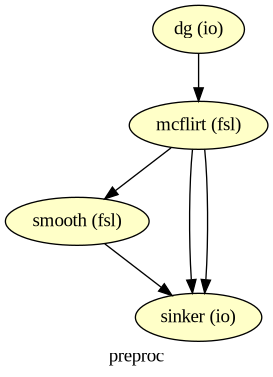
🥳 Final Example: Mini-Preprocessing-Workflow
Input Stream: DataGrabber to grab the functional image (run-1) of sub-01
FSL-Interfaces: Motion correction and spatial smoothing (kernel of 4 mm) of the functional image
Output Stream: DataSink to grab the motion-corrected image, the motion parameters and the smoothed image
# Initialise Workflow
wf_preproc = Workflow(name='preproc', base_dir=wf_work_dir)
wf_preproc.config["execution"]["crashfile_format"] = "txt"

# DataGrabber Node
dg = Node(
    interface= DataGrabber(infields=["subject_id", "run_id"], outfields=["func"]),
    name="dg")

# Location of dataset folder
dg.inputs.base_directory = data_dir
# Necessary default parameters
dg.inputs.sort_filelist = True #return a sorted filelist to ensure to match files to correct runs/tasks
dg.inputs.template = "*"
dg.inputs.run_id = 1
dg.inputs.subject_id = '01'
dg.inputs.template_args = dict(
    func=[["subject_id", "subject_id", "run_id"]],
)

# Specify the template structure to find the specific data
dg.inputs.field_template = dict(
    func="sub-%s/func/sub-%s_task-flanker_run-%d_bold.nii.gz",
)
# Create Motion Correction Node
mcflirt = Node(fsl.MCFLIRT(save_plots=True),
name='mcflirt')
# Create Smoothing node
smooth = Node(fsl.IsotropicSmooth(fwhm=4),
name='smooth')
# Connect the three nodes to each other
wf_preproc.connect([(dg, mcflirt, [("func", "in_file")]),
(mcflirt, smooth, [("out_file", "in_file")])])# Create DataSink object
sinker = Node(DataSink(), name='sinker')
# Name of the output folder
sinker.inputs.base_directory = opj(wf_work_dir, 'preproc/results')# Save output in one folder called 'preproc' with .@
wf_preproc.connect([(smooth, sinker, [('out_file', 'sub-01.@in_file')]),
(mcflirt, sinker, [('out_file', 'sub-01.@mc_img'),
('par_file', 'sub-01.@par_file')]),
])
# Visualize the graph
wf_preproc.write_graph(graph2use='colored', format='png', simple_form=True)
Image(filename=opj(wf_preproc.base_dir, wf_preproc.name, 'graph.png'))261005-14:45:13,369 nipype.workflow INFO:
Generated workflow graph: /home/jovyan/workspace/books/examples/workflows/output/working_dir/preproc/graph.png (graph2use=colored, simple_form=True).
# Run workflow with distributed processing
wf_preproc.run('MultiProc')
261005-14:45:13,379 nipype.workflow INFO:
Workflow preproc settings: ['check', 'execution', 'logging', 'monitoring']
261005-14:45:13,383 nipype.workflow INFO:
Running in parallel.
261005-14:45:13,385 nipype.workflow INFO:
[MultiProc] Running 0 tasks, and 1 jobs ready. Free memory (GB): 56.51/56.51, Free processors: 16/16, Free GPU slot:0/0.
261005-14:45:13,737 nipype.workflow INFO:
[Node] Setting-up "preproc.dg" in "/home/jovyan/workspace/books/examples/workflows/output/working_dir/preproc/dg".
261005-14:45:13,743 nipype.workflow INFO:
[Node] Executing "dg" <nipype.interfaces.io.DataGrabber>
261005-14:45:13,747 nipype.workflow INFO:
[Node] Finished "dg", elapsed time 0.000618s.
261005-14:45:15,386 nipype.workflow INFO:
[Job 0] Completed (preproc.dg).
261005-14:45:15,390 nipype.workflow INFO:
[MultiProc] Running 0 tasks, and 1 jobs ready. Free memory (GB): 56.51/56.51, Free processors: 16/16, Free GPU slot:0/0.
261005-14:45:15,647 nipype.workflow INFO:
[Node] Setting-up "preproc.mcflirt" in "/home/jovyan/workspace/books/examples/workflows/output/working_dir/preproc/mcflirt".
261005-14:45:15,654 nipype.workflow INFO:
[Node] Executing "mcflirt" <nipype.interfaces.fsl.preprocess.MCFLIRT>
261005-14:45:17,386 nipype.workflow INFO:
[MultiProc] Running 1 tasks, and 0 jobs ready. Free memory (GB): 56.31/56.51, Free processors: 15/16, Free GPU slot:0/0.
Currently running:
* preproc.mcflirt
261005-14:45:37,25 nipype.workflow INFO:
[Node] Finished "mcflirt", elapsed time 21.368725s.
261005-14:45:37,387 nipype.workflow INFO:
[Job 1] Completed (preproc.mcflirt).
261005-14:45:37,389 nipype.workflow INFO:
[MultiProc] Running 0 tasks, and 1 jobs ready. Free memory (GB): 56.51/56.51, Free processors: 16/16, Free GPU slot:0/0.
261005-14:45:37,528 nipype.workflow INFO:
[Node] Setting-up "preproc.smooth" in "/home/jovyan/workspace/books/examples/workflows/output/working_dir/preproc/smooth".
261005-14:45:37,535 nipype.workflow INFO:
[Node] Executing "smooth" <nipype.interfaces.fsl.maths.IsotropicSmooth>
261005-14:45:39,388 nipype.workflow INFO:
[MultiProc] Running 1 tasks, and 0 jobs ready. Free memory (GB): 56.31/56.51, Free processors: 15/16, Free GPU slot:0/0.
Currently running:
* preproc.smooth
261005-14:45:46,421 nipype.workflow INFO:
[Node] Finished "smooth", elapsed time 8.883315s.
261005-14:45:47,388 nipype.workflow INFO:
[Job 2] Completed (preproc.smooth).
261005-14:45:47,389 nipype.workflow INFO:
[MultiProc] Running 0 tasks, and 1 jobs ready. Free memory (GB): 56.51/56.51, Free processors: 16/16, Free GPU slot:0/0.
261005-14:45:47,532 nipype.workflow INFO:
[Node] Setting-up "preproc.sinker" in "/home/jovyan/workspace/books/examples/workflows/output/working_dir/preproc/sinker".
261005-14:45:47,540 nipype.workflow INFO:
[Node] Executing "sinker" <nipype.interfaces.io.DataSink>
261005-14:45:47,543 nipype.workflow INFO:
[Node] Finished "sinker", elapsed time 0.000872s.
261005-14:45:49,388 nipype.workflow INFO:
[Job 3] Completed (preproc.sinker).
261005-14:45:49,390 nipype.workflow INFO:
[MultiProc] Running 0 tasks, and 0 jobs ready. Free memory (GB): 56.51/56.51, Free processors: 16/16, Free GPU slot:0/0.
<networkx.classes.digraph.DiGraph at 0x7579040355e0>! tree output/working_dir/preproc/resultsoutput/working_dir/preproc/results
└── sub-01
├── sub-01_task-flanker_run-1_bold_mcf.nii.gz
├── sub-01_task-flanker_run-1_bold_mcf.nii.gz.par
└── sub-01_task-flanker_run-1_bold_mcf_smooth.nii.gz
2 directories, 3 files
Tip
- DataSink offers the substitution input field to rename output files. For example, to get rid of the string 'bold' and to adapt the file ending of the motion parameter file:
# Define substitution strings
substitutions = [('_bold', ''),
                 ('.nii.gz.par', '.par')]

# Feed the substitution strings to the DataSink node
sinker.inputs.substitutions = substitutions

# Run the workflow again with the substitutions in place
wf_preproc.run()
261005-14:45:51,580 nipype.workflow INFO:
Workflow preproc settings: ['check', 'execution', 'logging', 'monitoring']
261005-14:45:51,584 nipype.workflow INFO:
Running serially.
261005-14:45:51,585 nipype.workflow INFO:
[Node] Setting-up "preproc.dg" in "/home/jovyan/workspace/books/examples/workflows/output/working_dir/preproc/dg".
261005-14:45:51,588 nipype.workflow INFO:
[Node] Executing "dg" <nipype.interfaces.io.DataGrabber>
261005-14:45:51,590 nipype.workflow INFO:
[Node] Finished "dg", elapsed time 0.000295s.
261005-14:45:51,593 nipype.workflow INFO:
[Node] Setting-up "preproc.mcflirt" in "/home/jovyan/workspace/books/examples/workflows/output/working_dir/preproc/mcflirt".
261005-14:45:51,595 nipype.workflow INFO:
[Node] Cached "preproc.mcflirt" - collecting precomputed outputs
261005-14:45:51,595 nipype.workflow INFO:
[Node] "preproc.mcflirt" found cached.
261005-14:45:51,595 nipype.workflow INFO:
[Node] Setting-up "preproc.smooth" in "/home/jovyan/workspace/books/examples/workflows/output/working_dir/preproc/smooth".
261005-14:45:51,597 nipype.workflow INFO:
[Node] Cached "preproc.smooth" - collecting precomputed outputs
261005-14:45:51,598 nipype.workflow INFO:
[Node] "preproc.smooth" found cached.
261005-14:45:51,598 nipype.workflow INFO:
[Node] Setting-up "preproc.sinker" in "/home/jovyan/workspace/books/examples/workflows/output/working_dir/preproc/sinker".
261005-14:45:51,600 nipype.workflow INFO:
[Node] Outdated cache found for "preproc.sinker".
261005-14:45:51,603 nipype.workflow INFO:
[Node] Executing "sinker" <nipype.interfaces.io.DataSink>
261005-14:45:51,604 nipype.interface INFO:
sub: /home/jovyan/workspace/books/examples/workflows/output/working_dir/preproc/results/sub-01/sub-01_task-flanker_run-1_bold_mcf_smooth.nii.gz -> /home/jovyan/workspace/books/examples/workflows/output/working_dir/preproc/results/sub-01/sub-01_task-flanker_run-1_mcf_smooth.nii.gz
261005-14:45:51,605 nipype.interface INFO:
sub: /home/jovyan/workspace/books/examples/workflows/output/working_dir/preproc/results/sub-01/sub-01_task-flanker_run-1_bold_mcf.nii.gz -> /home/jovyan/workspace/books/examples/workflows/output/working_dir/preproc/results/sub-01/sub-01_task-flanker_run-1_mcf.nii.gz
261005-14:45:51,605 nipype.interface INFO:
sub: /home/jovyan/workspace/books/examples/workflows/output/working_dir/preproc/results/sub-01/sub-01_task-flanker_run-1_bold_mcf.nii.gz.par -> /home/jovyan/workspace/books/examples/workflows/output/working_dir/preproc/results/sub-01/sub-01_task-flanker_run-1_mcf.par
261005-14:45:51,606 nipype.workflow INFO:
[Node] Finished "sinker", elapsed time 0.002522s.
<networkx.classes.digraph.DiGraph at 0x757904034d70>! tree output/working_dir/preproc/resultsoutput/working_dir/preproc/results
└── sub-01
├── sub-01_task-flanker_run-1_bold_mcf.nii.gz
├── sub-01_task-flanker_run-1_bold_mcf.nii.gz.par
├── sub-01_task-flanker_run-1_bold_mcf_smooth.nii.gz
├── sub-01_task-flanker_run-1_mcf.nii.gz
├── sub-01_task-flanker_run-1_mcf.par
└── sub-01_task-flanker_run-1_mcf_smooth.nii.gz
2 directories, 6 files
Nipype in a Nutshell
Nipype offers easy to use building blocks for:
establishing neuroimaging data processing services
constructing tailored data processing pipelines
4. Pydra: A modern dataflow engine developed for the Nipype project

Pydra is a rewrite of the Nipype engine and forms the core of the Nipype 2.0 ecosystem and is meant to provide additional flexibility allowing users to define custom processing steps, interfaces and nested workflows.
Is a standalone project and designed to support analytics in any scientific domain (whereas Nipype is specifically designed for neuroimaging data analysis pipelines).
Pydra aims to offer a lightweight Python (3.7+) dataflow engine for the construction, manipulation, and distributed execution of computational graphs. It serves as a tool for building reproducible, scalable, reusable, and fully automated scientific workflows.
The architecture in combination with several key features makes Pydra a customizable and powerful dataflow engine:
Architecture with three core components: Tasks (basic runnable components) including Workflows, Submitter (Classes for unpacking Tasks into standalone jobs) and Workers (Classes used to execute Tasks coordinate resource managment).
Composable dataflows: Nested dataflows of arbitrary depths encouraging the creation of reusable dataflows.
Global cache support to reduce recomputation.
Support for dataflow execution in containerized environments enabling greater consistency for reproducibility.
Splitting & combining semantics for creating nested loops over input sets (MapReduce extended to graphs).
Key features in more detail:
Composable dataflows: A dataflow is represented as a directed acyclic graph, where each Task represents a Python function, execution of an external tool, or another dataflow. This enables the creation of simpe linear pipelines to complex nested dataflows of any depth. This approach promotes the development of reusable dataflows, enhancing modularity and scalability.
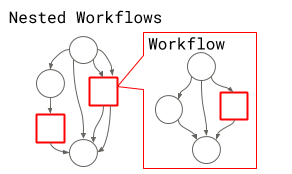
Figure 7: Nested workflow
Nipype-Pydra architectures
Pydra dataflow components: Task (basic runnable component with named inputs and outputs) with subclass Workflow
Nipype basic concepts: Node (defined inputs and outputs), Workflow
Support for Python functions (FunctionTask) and external (shell) commands (ShellCommandTask): Pydra enables the seamless incorporation and utilization of pre-existing functions within Python libraries, as well as external command-line tools. This facilitates straightforward integration of existing code and software into Pydra workflows.
Support for execution of Tasks in containerized environments (ContainerTask): Any dataflow or Task can be executed in an associated container (via Docker or Singularity) enabling greater consistency for reproducibility.
Nipype-Pydra architectures
Pydra Task subclasses: FunctionTask, ShellCommandTask, ContainerTask (Docker, Singularity)
Nipype advanced concepts: base interfaces or interfaces for using existing functionality in other packages: wrapping of command line tools (nipype.interfaces.base CommandLine), run arbitrary function as nipype interface (nipype.interfaces.utility Function)
Splitting & combining semantics for creating nested loops over input sets: Versatile functionality for nested loop creation across input sets: Tasks or dataflows can iterate over input parameter sets, and their outputs can be recombined. This functionality resembles the Map-Reduce model, but Pydra extends this capability to graphs with nested dataflows.
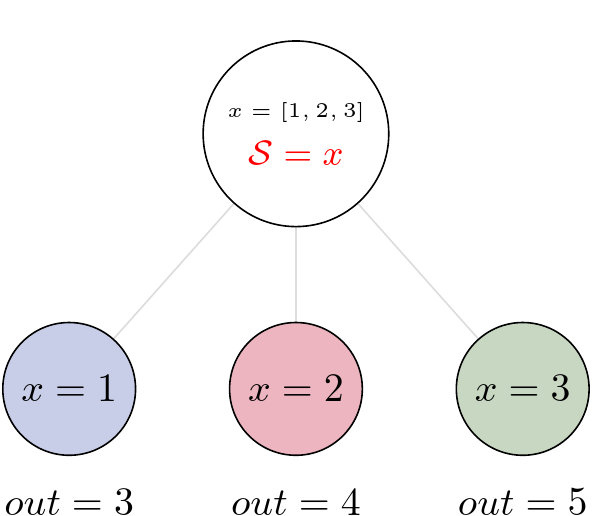
Figure 8: Flexible splitting and merging in Pydra
Pydra-Nipype architectures
Pydra: Optional State class: splitter and combiner attribute to specify how inputs should be split into parameter sets, and combined after Task execution
Nipype: MapNode, Iterables/ Synchronize, JoinNode
Both Pydra and Nipype offer similar functionalities regarding
Hashing to manage task execution and caching of intermediate results. Hashes are computed for task inputs and parameters and used to determine task dependencies and to avoid unnecessary recomputation.
Provenance Tracking capabilities to captures dataflow execution activities as a provenance graph. It tracks inputs, outputs, and resources consumed by each task in a workflow, providing a detailed record of the workflow execution.
A content-addressable global cache to reduce recomputation: Hash values are computed for each graph and each Task. This supports reusing of previously computed and stored dataflows and Tasks. It also allows multiple people in or across laboratories to use each others’s execution outputs on the same data without having to rerun the same computation.
Auditing and provenance tracking: Pydra provides a simple JSON-LD-based message passing mechanism to capture the dataflow execution activities as a provenance graph. These messages track inputs and outputs of each task in a dataflow, and the resources consumed by the task.
Take Home Message
Pydra and Nipype are both open-source Python projects and offer similar functionalities for building and executing computational pipelines, including caching. However, they differ in their :
Design Philosophy: Building pipelines for neuroimaging in vs. pipelines for any scientific domain
Flexibility: Very flexible splitting and merging semantics in Pydra to create complex pipelines of any depth
Execution Model: Pydra leverages modern parallel and distributed computing frameworks such as Dask
Community and Ecosystem: Well-established community and ecosystem vs. a growing community
Dependencies in Jupyter/Python
Using the package watermark to document system environment and software versions used in this notebook, alongside the Neurodesktop version extracted from the
JUPYTER_IMAGEorNEURODESKTOP_VERSIONenvironment variables.
import os

%load_ext watermark

%watermark
%watermark --iversions

neurodesktop_version = (
    os.environ.get('JUPYTER_IMAGE', '').split(':')[-1] or
    os.environ.get('NEURODESKTOP_VERSION', 'unknown')
)

print(f"Neurodesktop version: {neurodesktop_version}")
Last updated: 2026-10-05T14:45:51.758979+00:00
Python implementation: CPython
Python version : 3.13.15
IPython version : 9.17.1
Compiler : GCC 15.3.0
OS : Linux
Release : 6.8.0-111-generic
Machine : x86_64
Processor : x86_64
CPU cores : 16
Architecture: 64bit
IPython : 9.17.1
matplotlib: 3.11.2
nibabel : 5.3.3
nilearn : 0.13.1
nipype : 1.12.0
numpy : 2.5.3
Neurodesktop version: 2026-09-28
- Esteban, O., Markiewicz, C. J., Burns, C., Goncalves, M., Jarecka, D., Ziegler, E., Berleant, S., Ellis, D. G., Pinsard, B., Madison, C., Waskom, M., Notter, M. P., Clark, D., Manhães-Savio, A., Halchenko, Y. O., Clark, D., Jordan, K., Dayan, M., Norgaard, M., … Ghosh, S. (2025). nipy/nipype: 1.10.0. Zenodo. 10.5281/ZENODO.15054182
- Jenkinson, M., Beckmann, C. F., Behrens, T. E. J., Woolrich, M. W., & Smith, S. M. (2012). FSL. NeuroImage, 62(2), 782–790. 10.1016/j.neuroimage.2011.09.015
- Smith, S. M. (2002). Fast robust automated brain extraction. Human Brain Mapping, 17(3), 143–155. 10.1002/hbm.10062
- Gorgolewski, K., Burns, C. D., Madison, C., Clark, D., Halchenko, Y. O., Waskom, M. L., & Ghosh, S. S. (2011). Nipype: A Flexible, Lightweight and Extensible Neuroimaging Data Processing Framework in Python. Frontiers in Neuroinformatics, 5. 10.3389/fninf.2011.00013
- Jarecka, D., Goncalves, M., Markiewicz, C., Esteban, O., Lo, N., Kaczmarzyk, J., & Ghosh, S. (2020). Pydra - a flexible and lightweight dataflow engine for scientific analyses. Proceedings of the 19th Python in Science Conference, 132–139. 10.25080/majora-342d178e-012
- Kelly, A. M. C., Uddin, L. Q., Biswal, B. B., Castellanos, F. X., & Milham, M. P. (2008). Competition between functional brain networks mediates behavioral variability. NeuroImage, 39(1), 527–537. 10.1016/j.neuroimage.2007.08.008