Run this notebook
A Nipype walkthrough, with SLURM scaling
Author: Monika Doerig
Date: 08 May 2026
License:
Note: This notebook uses neuroimaging tools from Neurocontainers; those tools retain their original licenses. Please see Neurodesk citation guidelines for details.
Use of AI: This notebook was generated with assistance from Anthropic’s Claude (via Claude Code) across several iterations and then revised by the author. The author reviewed the final content and takes responsibility for it.
Citation and Resources
Tools included in this workflow
FSL
Jenkinson, M., Beckmann, C. F., Behrens, T. E. J., Woolrich, M. W., & Smith, S. M. (2012). FSL. NeuroImage, 62(2), 782–790. Jenkinson et al. (2012)
Smith S. M. (2002). Fast robust automated brain extraction. Human brain mapping, 17(3), 143–155. Smith (2002)
ANTs
Tustison, N.J., Cook, P.A., Holbrook, A.J. et al. The ANTsX ecosystem for quantitative biological and medical imaging. Sci Rep 11, 9068 (2021). Tustison et al. (2021)
N. J. Tustison et al., “N4ITK: Improved N3 Bias Correction,” in IEEE Transactions on Medical Imaging, vol. 29, no. 6, pp. 1310-1320, June 2010, doi: Tustison et al. (2010)
SPM12
Friston, K. J., et al. (2007). Statistical Parametric Mapping: The Analysis of Functional Brain Images. Elsevier/ Academic Press.
Nipype
Gorgolewski K, Burns CD, Madison C, Clark D, Halchenko YO, Waskom ML and Ghosh SS (2011) Nipype: A Flexible, Lightweight and Extensible Neuroimaging Data Processing Framework in Python. Front. Neuroinform. 5:13. doi: Gorgolewski et al. (2011)
Workflows this work is based on
Notter, M. P. (2018). handson_preprocessing.ipynb — PyBrain Workshop, Nipype Tutorial. handson
_preprocessing .ipynb. The workflow design here follows Notter’s preprocessing recipe; the path-resolution approach is adapted for Neurodesk’s container layout.
Related discussion
Neurodesk discussion #745 — diagnosis of hardcoded SPM/FSL paths in Notter’s tutorial when run on Neurodesk: https://
github .com /neurodesk /neurodesk .github .io -hugo /discussions /745
Dataset
Gorgolewski KJ, Storkey A, Bastin ME, Whittle IR, Wardlaw JM, and Pernet CR (2022). A test-retest fMRI dataset for motor, language and spatial attention functions. . OpenNeuro. [Dataset] doi:10
.18112 /openneuro .ds000114 .v1 .0.2
Introduction
On Neurodesk, every tool runs out of a versioned Singularity container at a slightly different path (different version dates, different versions), so hardcoded resource paths like /opt/spm12-r7219/spm12_mcr/spm12/tpm/TPM.nii will break. Recognising hardcoded paths and translating them into the Neurodesk equivalent is the first thing to do when porting any non-trivial workflow here.
This notebook covers:
A general recipe for finding container-internal resource files (such as
TPM.nii,MNI152_T1_2mm_brain.nii.gz, orbbr.sch). One small helper, used three times — for the SPM tissue probability map, FSL’s MNI152 template, and FSL’s BBR schedule file.Scaling the workflow across the cluster with Nipype’s SLURM execution plugin. Nipype can submit each Node as its own SLURM job, with cluster-level parallelism, by changing one argument to
wf.run(...).
The pipeline itself is a small but realistic anatomical preprocessing chain:
ANTs N4 bias correction → FSL BET → SPM NewSegment → BBR registration of fMRI to T1 → linear registration of T1 to MNI152.What this notebook deliberately leaves out
The pipeline above is intentionally simplified to keep the focus on Neurodesk-specific patterns (path resolution, multi-tool composition, SLURM execution). A production preprocessing pipeline would normally also include steps like:
Motion correction (e.g. FSL
MCFLIRT, SPMRealign) — would normally precede the mean-BOLD step. Skipping it lets the functional branch reduce to a single mean image.Nonlinear registration to MNI (e.g. FSL
FNIRTor ANTsSyN) — would follow the linearFLIRTstep shown here. Linear-only is good enough for a tutorial overlay.Slice-timing correction, spatial smoothing, temporal high-pass filtering, distortion correction — none included.
The focus here is the path-handling and execution-plugin patterns, not a turnkey preprocessing pipeline.
Table of contents
1. Load software tools and import python libraries
2. The container-resource-path helper
3. Data Preparation
4. Analysis: build and run the Nipype workflow
5. Quality control
6. Scaling with Nipype’s SLURM execution plugin
1. Load software tools and import python libraries
We pin explicit versions so the notebook is reproducible. SPM12 in Neurodesk ships as the standalone version (compiled with MATLAB Compiler Runtime — no full MATLAB licence required).
# Load the three neuroimaging tools we'll use.
# Versions are pinned so the notebook is reproducible.
import module
await module.load('fsl/6.0.7.18')
await module.load('ants/2.6.5')
await module.load('spm12/r7771')
await module.list()
['fsl/6.0.7.18', 'ants/2.6.5', 'spm12/r7771']nipype, ipyniivue, matplotlib and datalad are pre-installed in the Neurodesk base image. We pip install nilearn for the QC plots at the end.
%%capture
!pip install nilearn==0.13.1
# Standard library
import os
import shutil
from pathlib import Path
# Third-party
import matplotlib.pyplot as plt
from nilearn import plotting
from ipyniivue import NiiVue
from IPython.display import Image, display
# Nipype
from nipype import Node, Workflow
from nipype.interfaces import ants, fsl, spm
from nipype.interfaces.utility import Function, IdentityInterface
from nipype.algorithms.misc import Gunzipfsl.FSLCommand.set_default_output_type('NIFTI_GZ')
print(fsl.FSLCommand._output_type) NIFTI_GZ
2. The container-resource-path helper
Many neuroimaging tasks need files that ship inside a tool’s installation — SPM’s tissue probability map (TPM.nii), FSL’s MNI152 reference template($FSLDIR/data/standard/MNI152_T1_2mm_brain.nii.gz), FSL’s BBR schedule ($FSLDIR/etc/flirtsch/bbr.sch), etc.
As mentioned, on Neurodesk, every tool runs out of a Singularity container at a versioned path like /cvmfs/.../containers/fsl_6.0.7.18_20250928/, so those tool-internal paths aren’t on the host filesystem at their “usual” location. The container directory is mounted as <containerdir>/<containerdir>.simg/ (transparent singularity), and inside that mount the original file structure (/opt/fsl-6.0.7.18/...) lives. To use any of these files from a host-side process (a Nipype workflow, a custom Python script, a bash command), you need to translate the tool’s internal path into its Neurodesk-host-visible equivalent inside the .simg mount.
So a hardcoded path like /opt/fsl-6.0.7.18/data/standard/MNI152_T1_2mm_brain.nii.gz won’t resolve on the host filesystem — you need:
/cvmfs/.../containers/fsl_6.0.7.18_20250928/fsl_6.0.7.18_20250928.simg/opt/fsl-6.0.7.18/data/standard/MNI152_T1_2mm_brain.nii.gzAlso note: the date suffix (_20250928) is tied to a specific container build and can change when the container is rebuilt (so even the absolute path on /cvmfs isn’t necessarily stable).
The recipe
After module load <tool>/<version>, the tool’s wrapper binary is on PATH. shutil.which("<tool>") returns the wrapper path; its parent directory is the container directory; that directory’s name matches the .simg mount point. Resource files inside the container can be addressed by appending their original internal path.
def container_resource(tool: str, internal_path: str) -> Path:
    """Return the host path to a file inside a Neurodesk container.

    Parameters
    ----------
    tool
        Name of the tool's launcher binary (e.g. 'fsl', 'spm12', 'antsRegistration').
        Must be on PATH after `module load`.
    internal_path
        The file's path *inside* the container (e.g. 'opt/fsl-6.0.7.18/data/standard/MNI152_T1_2mm_brain.nii.gz').

    Returns
    -------
    Path to the file on the host filesystem (inside the .simg mount).
    """
    launcher = shutil.which(tool)
    if launcher is None:
        raise RuntimeError(f"'{tool}' not found on PATH — did you `module load` it?")
    container_dir = Path(launcher).parent
    return container_dir / f"{container_dir.name}.simg" / internal_path
Resolve the three paths we’ll need
All three files live inside the container’s .simg mount on /cvmfs. The helper computes their host-visible paths from the loaded module so you don’t need to know the version-dated container directory by hand.
# 1. SPM12 tissue probability map — used by NewSegment.
SPM_TPM = container_resource('spm12', 'opt/spm12/spm12_mcr/spm12/spm12/tpm/TPM.nii')
# 2. FSL MNI152 reference template — used by FLIRT for T1→MNI registration.
FSL_MNI = container_resource('fsl', 'opt/fsl-6.0.7.18/data/standard/MNI152_T1_2mm_brain.nii.gz')
# 3. FSL BBR schedule — used by FLIRT for fMRI→T1 BBR registration.
#    `etc/flirtsch/` is FSL's canonical runtime location ($FSLDIR/etc/flirtsch/...).
FSL_BBR = container_resource('fsl', 'opt/fsl-6.0.7.18/etc/flirtsch/bbr.sch')

for label, p in [('SPM TPM', SPM_TPM), ('FSL MNI152', FSL_MNI), ('FSL bbr.sch', FSL_BBR)]:
    exists = '✓' if p.exists() else '✗ MISSING'
    print(f"{exists}  {label:14s} {p}")
✓ SPM TPM /cvmfs/neurodesk.ardc.edu.au/containers/spm12_r7771_20260708/spm12_r7771_20260708.simg/opt/spm12/spm12_mcr/spm12/spm12/tpm/TPM.nii
✓ FSL MNI152 /cvmfs/neurodesk.ardc.edu.au/containers/fsl_6.0.7.18_20250928/fsl_6.0.7.18_20250928.simg/opt/fsl-6.0.7.18/data/standard/MNI152_T1_2mm_brain.nii.gz
✓ FSL bbr.sch /cvmfs/neurodesk.ardc.edu.au/containers/fsl_6.0.7.18_20250928/fsl_6.0.7.18_20250928.simg/opt/fsl-6.0.7.18/etc/flirtsch/bbr.sch
# Find a resource by filename inside a Neurodesk container.
# `container_resource('fsl', '')` returns the root of the FSL container's .simg mount,
# which we can hand straight to `find`. The `-path` filter limits to FSL's canonical
# runtime location ($FSLDIR/etc/flirtsch/...); `-not -path "*pkgs*"` skips conda's
# package cache, which keeps byte-identical duplicates of every shipped file.
fsl_simg = container_resource('fsl', '')
!find {fsl_simg}/opt -path "*etc/flirtsch*" -not -path "*pkgs*" -name "bbr.sch" 2>/dev/null
/cvmfs/neurodesk.ardc.edu.au/containers/fsl_6.0.7.18_20250928/fsl_6.0.7.18_20250928.simg/opt/fsl-6.0.7.18/etc/flirtsch/bbr.sch
3. Data Preparation
We use ds000114 (a finger/foot/lips motor task), pulling one subject’s T1 and one short functional run via DataLad.
%%bash
# Install ds000114 from OpenNeuro (lightweight — only metadata is fetched).
[ -d ds000114 ] || datalad install https://github.com/OpenNeuroDatasets/ds000114.git

cd ds000114
# Get the actual NIfTI data for one subject + one short functional run.
datalad get sub-01/ses-test/anat/sub-01_ses-test_T1w.nii.gz
datalad get sub-01/ses-test/func/sub-01_ses-test_task-fingerfootlips_bold.nii.gz

ls -lh sub-01/ses-test/anat/ sub-01/ses-test/func/
sub-01/ses-test/anat/:
total 4.0K
lrwxrwxrwx 1 jovyan jovyan 143 Oct 4 22:00 sub-01_ses-test_T1w.nii.gz -> ../../../.git/annex/objects/QP/jm/MD5E-s8677710--d6820f6cb8fb965e864419c14f6a22d5.nii.gz/MD5E-s8677710--d6820f6cb8fb965e864419c14f6a22d5.nii.gz
sub-01/ses-test/func/:
total 28K
lrwxrwxrwx 1 jovyan jovyan 145 Oct 4 22:00 sub-01_ses-test_task-covertverbgeneration_bold.nii.gz -> ../../../.git/annex/objects/mx/zJ/MD5E-s22944165--71b1eda077a1003a177552f6c380323a.nii.gz/MD5E-s22944165--71b1eda077a1003a177552f6c380323a.nii.gz
lrwxrwxrwx 1 jovyan jovyan 145 Oct 4 22:00 sub-01_ses-test_task-fingerfootlips_bold.nii.gz -> ../../../.git/annex/objects/k6/4f/MD5E-s24454931--e9ab535d84a922b0c7ed52461244cf47.nii.gz/MD5E-s24454931--e9ab535d84a922b0c7ed52461244cf47.nii.gz
lrwxrwxrwx 1 jovyan jovyan 145 Oct 4 22:00 sub-01_ses-test_task-linebisection_bold.nii.gz -> ../../../.git/annex/objects/32/Qq/MD5E-s31617092--151bc230c3b577110883369b6fad0daa.nii.gz/MD5E-s31617092--151bc230c3b577110883369b6fad0daa.nii.gz
-rw-rw-r-- 1 jovyan jovyan 4.9K Oct 4 22:00 sub-01_ses-test_task-linebisection_events.tsv
lrwxrwxrwx 1 jovyan jovyan 145 Oct 4 22:00 sub-01_ses-test_task-overtverbgeneration_bold.nii.gz -> ../../../.git/annex/objects/p3/fZ/MD5E-s12048980--648c9094579aa5d047a5f6db468f9bc9.nii.gz/MD5E-s12048980--648c9094579aa5d047a5f6db468f9bc9.nii.gz
lrwxrwxrwx 1 jovyan jovyan 145 Oct 4 22:00 sub-01_ses-test_task-overtwordrepetition_bold.nii.gz -> ../../../.git/annex/objects/56/GV/MD5E-s10362270--6a5c483d118db28ff8a62455def5501c.nii.gz/MD5E-s10362270--6a5c483d118db28ff8a62455def5501c.nii.gz
4. Analysis: build and run the Nipype workflow
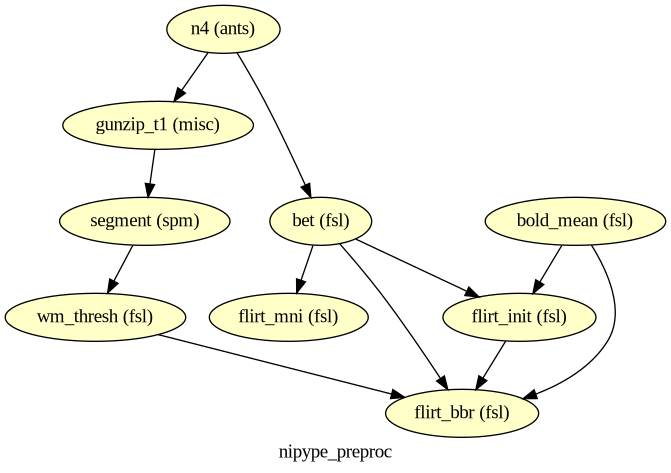
Pipeline
T1w ─► N4 (ANTs) ─► BET (FSL) ─┬─► FLIRT 12 DOF ─► T1 in MNI152
                               │
                               └─► SPM NewSegment ─► c2 (WM) ─► threshold ─► WM mask
                                                                              │
fMRI 4D ─► MeanImage (FSL) ─► BOLD ref ─────────────────────────► FLIRT BBR  ◄┘
                                                                  (uses bbr.sch + WM mask)
Each Nipype Node wraps one external command. The Workflow declares how their outputs feed each others’ inputs.
Pick a subject
Set the subject identifier once here. To process a different subject from ds000114, change this value and re-run from this cell down. Make sure to download the required subjects first.
# Subject identifier
subject_id = '01'
# Resolve input file paths from the parameter.
#data_dir = Path('ds000114') / f'sub-{subject_id}' / 'ses-test'
data_dir = (Path('ds000114') / f'sub-{subject_id}' / 'ses-test').resolve()
t1_path = data_dir / 'anat' / f'sub-{subject_id}_ses-test_T1w.nii.gz'
bold_path = data_dir / 'func' / f'sub-{subject_id}_ses-test_task-fingerfootlips_bold.nii.gz'
assert t1_path.exists() and bold_path.exists(), 'input files not found — check subject_id'
print('T1: ', t1_path)
print('BOLD:', bold_path)T1: /home/jovyan/workspace/books/examples/workflows/ds000114/sub-01/ses-test/anat/sub-01_ses-test_T1w.nii.gz
BOLD: /home/jovyan/workspace/books/examples/workflows/ds000114/sub-01/ses-test/func/sub-01_ses-test_task-fingerfootlips_bold.nii.gz
Build the Nipype nodes
# --- Anatomical chain: N4 → BET → SPM NewSegment ---

n4 = Node(ants.N4BiasFieldCorrection(
    dimension=3,
    save_bias=False,
), name='n4')

gunzip_t1 = Node(Gunzip(), name='gunzip_t1')

bet = Node(fsl.BET(
    robust=True,
    frac=0.5,
), name='bet')

# SPM NewSegment with the standard 6-tissue specification.
# `tissues` is a list of (TPM-with-class, num_gaussians, (native, dartel), (modulated, unmodulated)).
tissues = [
    ((str(SPM_TPM), 1), 1, (True,  False), (False, False)),  # GM
    ((str(SPM_TPM), 2), 1, (True,  False), (False, False)),  # WM
    ((str(SPM_TPM), 3), 2, (True,  False), (False, False)),  # CSF
    ((str(SPM_TPM), 4), 3, (False, False), (False, False)),  # bone
    ((str(SPM_TPM), 5), 4, (False, False), (False, False)),  # soft tissue
    ((str(SPM_TPM), 6), 2, (False, False), (False, False)),  # background
]
segment = Node(spm.NewSegment(tissues=tissues), name='segment')
stty: 'standard input': Inappropriate ioctl for device
# --- Threshold the WM probability map (c2) into a binary WM mask. ---
# We use FSL's fslmaths (via Nipype's fsl.Threshold). We will also need a one-line
# helper to extract c2 from NewSegment's nested-list output
# [[c1], [c2], [c3], ...] — applied inline in the workflow connection below.

def pick_c2(class_images):
    """Pick the WM probability map (c2) from NewSegment's native_class_images."""
    return class_images[1][0]

wm_thresh = Node(fsl.Threshold(thresh=0.5, args='-bin'), name='wm_thresh')
# --- Functional reference: mean of the 4D BOLD series. ---
bold_mean = Node(fsl.MeanImage(dimension='T'), name='bold_mean')
# --- T1 → MNI152 (12 DOF affine, uses container-resolved MNI reference). ---
flirt_mni = Node(fsl.FLIRT(
reference=str(FSL_MNI),
dof=12,
cost='corratio',
), name='flirt_mni')
# --- fMRI → T1 (initial 6 DOF registration, then BBR refinement). ---
flirt_init = Node(fsl.FLIRT(
dof=6,
cost='corratio',
), name='flirt_init')
flirt_bbr = Node(fsl.FLIRT(
dof=6,
cost='bbr',
schedule=str(FSL_BBR), # ← container-resolved BBR schedule
), name='flirt_bbr')Connect the workflow
wf = Workflow(name='nipype_preproc', base_dir=str(Path.cwd() / 'work'))

wf.connect([
    # T1 anatomical chain
    (n4,        bet,        [('output_image', 'in_file')]),
    (n4,        gunzip_t1, [('output_image', 'in_file')]),
    (gunzip_t1, segment,   [('out_file',     'channel_files')]),
    # Apply pick_c2 inline so wm_thresh receives a single file path (not the nested list).
    (segment,   wm_thresh,  [(('native_class_images', pick_c2), 'in_file')]),

    # T1 brain → MNI152
    (bet,       flirt_mni,  [('out_file', 'in_file')]),

    # fMRI mean → T1 brain (initial), then BBR with WM mask
    (bold_mean, flirt_init, [('out_file', 'in_file')]),
    (bet,       flirt_init, [('out_file', 'reference')]),
    (bold_mean, flirt_bbr,  [('out_file', 'in_file')]),
    (bet,       flirt_bbr,  [('out_file', 'reference')]),
    (flirt_init, flirt_bbr, [('out_matrix_file', 'in_matrix_file')]),
    (wm_thresh, flirt_bbr,  [('out_file', 'wm_seg')]),
])

# Wire the parameters into the workflow inputs.
n4.inputs.input_image = str(t1_path)
bold_mean.inputs.in_file = str(bold_path)
# Render the workflow graph for inspection.
wf.write_graph(graph2use='colored', format='png', simple_form=True)
display(Image(filename=str(Path(wf.base_dir) / wf.name / 'graph.png')))261004-22:04:48,965 nipype.workflow INFO:
Generated workflow graph: /home/jovyan/workspace/books/examples/workflows/work/nipype_preproc/graph.png (graph2use=colored, simple_form=True).
Run the workflow
Locally we use the MultiProc plugin so independent nodes (e.g. NewSegment and the FLIRT chain) run in parallel.
wf.run(plugin='MultiProc', plugin_args={'n_procs': 4})261004-22:04:48,984 nipype.workflow INFO:
Workflow nipype_preproc settings: ['check', 'execution', 'logging', 'monitoring']
261004-22:04:48,990 nipype.workflow INFO:
Running in parallel.
261004-22:04:48,993 nipype.workflow INFO:
[MultiProc] Running 0 tasks, and 2 jobs ready. Free memory (GB): 56.51/56.51, Free processors: 4/4, Free GPU slot:0/0.
261004-22:04:49,106 nipype.workflow INFO:
[Job 0] Cached (nipype_preproc.n4).
261004-22:04:49,108 nipype.workflow INFO:
[Job 1] Cached (nipype_preproc.bold_mean).
261004-22:04:51,115 nipype.workflow INFO:
[Job 2] Cached (nipype_preproc.bet).
261004-22:04:51,117 nipype.workflow INFO:
[Job 3] Cached (nipype_preproc.gunzip_t1).
261004-22:04:52,993 nipype.workflow INFO:
[MultiProc] Running 0 tasks, and 3 jobs ready. Free memory (GB): 56.51/56.51, Free processors: 4/4, Free GPU slot:0/0.
261004-22:04:53,104 nipype.workflow INFO:
[Job 4] Cached (nipype_preproc.flirt_mni).
261004-22:04:53,107 nipype.workflow INFO:
[Job 5] Cached (nipype_preproc.flirt_init).
261004-22:04:53,110 nipype.workflow INFO:
[Job 6] Cached (nipype_preproc.segment).
261004-22:04:54,993 nipype.workflow INFO:
[MultiProc] Running 0 tasks, and 1 jobs ready. Free memory (GB): 56.51/56.51, Free processors: 4/4, Free GPU slot:0/0.
261004-22:04:55,111 nipype.workflow INFO:
[Job 7] Cached (nipype_preproc.wm_thresh).
261004-22:04:57,105 nipype.workflow INFO:
[Job 8] Cached (nipype_preproc.flirt_bbr).
<networkx.classes.digraph.DiGraph at 0x7a61ed3474d0>5. Quality control
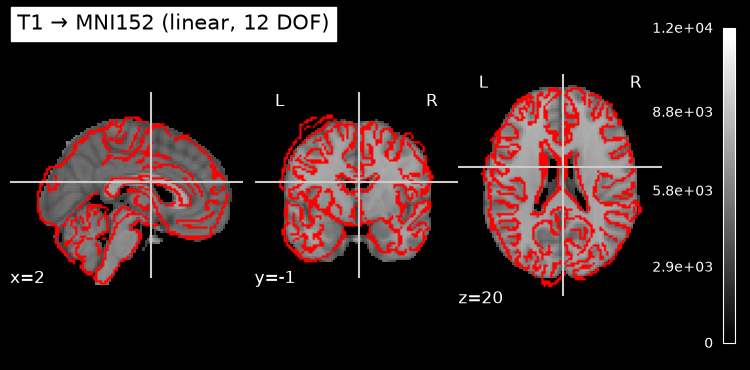
Two visual checks: T1 registered to MNI152 (linear), and fMRI reference registered to T1 via BBR.
work = Path(wf.base_dir) / wf.name

t1_in_mni = next((work / 'flirt_mni').glob('*.nii.gz'))
bold_in_t1 = next((work / 'flirt_bbr').glob('*.nii.gz'))
#t1_brain = next((work / 'bet').glob('*.nii.gz'))

display = plotting.plot_anat(
    str(FSL_MNI), title='T1 → MNI152 (linear, 12 DOF)', display_mode='ortho')
display.add_edges(str(t1_in_mni))
#plt.savefig('qc_t1_to_mni.png', dpi=120, bbox_inches='tight')
plt.show()
# Interactive BBR QC with ipyniivue.
# Two volumes overlaid:
#   - BOLD (registered to T1) — gray
#   - WM mask used by BBR — red, semi-transparent
# If BBR worked, the red WM contour should sit along tissue boundaries in the BOLD.

wm_mask = next((Path(wf.base_dir) / wf.name / 'wm_thresh').glob('*.nii*'))

nv = NiiVue()
nv.load_volumes([
    {"path": str(bold_in_t1), "colormap": "gray"},
    {"path": str(wm_mask),    "colormap": "red", "opacity": 0.5},
])
nv
[HF-patcher] sub-01: path → url
[HF-patcher] c2sub-01: path → url
6. Scaling with Nipype’s SLURM execution plugin
Above we ran the workflow with the MultiProc plugin — Nipype’s built-in plugin for parallel execution on a single machine. Nipype also has a SLURM plugin that submits each Node as its own SLURM job.
The only change to the run command is the plugin argument:
wf.run(
    plugin='SLURM',
    plugin_args={
        'sbatch_args': '--mem=16G --time=01:00:00 --cpus-per-task=4',
    },
)
What this does:
Each Nipype Node becomes one
sbatchjob. Independent nodes (e.g.flirt_mniand the BBR sub-chain) run in parallel as separate cluster jobs.Dependencies are honoured automatically. Nipype waits for parent jobs to finish before submitting children — you do not write the dependency DAG yourself.
Same workflow code, different scheduler.
wf.connect(...), the Nodes, and all their inputs stay exactly as they are above.No
.sbatfile required. Nipype auto-generates a basic sbatch template per Node. Pass a customtemplatefile (viaplugin_args={'template': 'mytemplate.sh', ...}) only if you have non-standard cluster requirements (e.g. account names, partitions, GRES).
Per-node resource customisation
sbatch_args is passed to every sbatch invocation. If individual nodes need different resources, set them on the Node directly:
segment.plugin_args = {'sbatch_args': '--mem=24G --time=00:30:00'}Per-node sbatch_args are concatenated with the workflow-level defaults; for any flag specified twice (e.g. --mem), SLURM uses the later (per-node) value.
Requirements
The kernel running this notebook must be on a host where
sbatchis available (login node, or a compute node with the SLURM client).For an alternative pattern — a single Papermill-driven array job that fans out per-subject — see
papermill-slurm-submission-example.ipynb. The two approaches are complementary: Nipype’s plugin is finer-grained (one job per node), Papermill’s array is coarser-grained (one job per subject).
Dependencies in Jupyter/Python
Using the package watermark to document system environment and software versions used in this notebook, alongside the Neurodesktop version extracted from the
JUPYTER_IMAGEorNEURODESKTOP_VERSIONenvironment variables.
import os

%load_ext watermark

%watermark
%watermark --iversions

neurodesktop_version = (
    os.environ.get('JUPYTER_IMAGE', '').split(':')[-1] or
    os.environ.get('NEURODESKTOP_VERSION', 'unknown')
)

print(f"Neurodesktop version: {neurodesktop_version}")
Last updated: 2026-10-04T22:04:59.335350+00:00
Python implementation: CPython
Python version : 3.13.15
IPython version : 9.17.1
Compiler : GCC 15.3.0
OS : Linux
Release : 6.8.0-111-generic
Machine : x86_64
Processor : x86_64
CPU cores : 16
Architecture: 64bit
IPython : 9.17.1
ipyniivue : 2.4.4
json : 2.0.9
matplotlib: 3.11.2
nilearn : 0.13.1
nipype : 1.12.0
Neurodesktop version: 2026-09-28
- Jenkinson, M., Beckmann, C. F., Behrens, T. E. J., Woolrich, M. W., & Smith, S. M. (2012). FSL. NeuroImage, 62(2), 782–790. 10.1016/j.neuroimage.2011.09.015
- Smith, S. M. (2002). Fast robust automated brain extraction. Human Brain Mapping, 17(3), 143–155. 10.1002/hbm.10062
- Tustison, N. J., Cook, P. A., Holbrook, A. J., Johnson, H. J., Muschelli, J., Devenyi, G. A., Duda, J. T., Das, S. R., Cullen, N. C., Gillen, D. L., Yassa, M. A., Stone, J. R., Gee, J. C., & Avants, B. B. (2021). The ANTsX ecosystem for quantitative biological and medical imaging. Scientific Reports, 11(1). 10.1038/s41598-021-87564-6
- Tustison, N. J., Avants, B. B., Cook, P. A., Yuanjie Zheng, Egan, A., Yushkevich, P. A., & Gee, J. C. (2010). N4ITK: Improved N3 Bias Correction. IEEE Transactions on Medical Imaging, 29(6), 1310–1320. 10.1109/tmi.2010.2046908
- Gorgolewski, K., Burns, C. D., Madison, C., Clark, D., Halchenko, Y. O., Waskom, M. L., & Ghosh, S. S. (2011). Nipype: A Flexible, Lightweight and Extensible Neuroimaging Data Processing Framework in Python. Frontiers in Neuroinformatics, 5. 10.3389/fninf.2011.00013