Run this notebook
Date: 18 Nov 2024
License:
Note: If this notebook uses neuroimaging tools from Neurocontainers, those tools retain their original licenses. Please see Neurodesk citation guidelines for details.
Citation and Resources:
Tools included in this workflow
MRtrix3Tissue:
MRtrix3Tissue, a fork of MRtrix3 (Tournier et al. 2019)
Tournier, J.-D., Smith, R., Raffelt, D., Tabbara, R., Dhollander, T., Pietsch, M., Christiaens, D., Jeurissen, B., Yeh, C.-H., & Connelly, A. (2019). MRtrix3: A fast, flexible and open software framework for medical image processing and visualisation. NeuroImage, 202, 116137. Tournier et al. (2019)
Dataset
Dataset from OpenNeuro: BTC_postop
Hannelore Aerts and Daniele Marinazzo (2022). BTC_postop. OpenNeuro. [Dataset] doi: doi:10
.18112 /openneuro .ds002080 .v4 .0.0
Introduction
This notebook demonstrates advanced multi-tissue modelling using MRtrix3Tissue, an extension of the MRtrix3 framework designed for enhanced 3-tissue constrained spherical deconvolution (MSMT-CSD) and quantitative tissue analysis.
While the MRtrix series introduces preprocessing (Part 1), multi-tissue CSD and tissue boundary estimation (Part 2), and registration and streamline generation (Part 3), this notebook focuses on extended tissue modelling capabilities beyond tractography.
In particular, this tutorial demonstrates:
3-tissue response function estimation using the dhollander algorithm
Multi-tissue CSD reconstruction
Intensity normalisation across tissue compartments (
mtnormalise)Tissue fraction–based masking
Derivation of quantitative tissue maps (e.g., ADC-based metrics)
Although the core modelling approach (3-tissue response estimation and MSMT-CSD) is conceptually similar to Part 2 of the MRtrix series, the goal here is not streamline generation but rather advanced tissue characterisation and quantitative analysis.
Load software tools and import python libraries
%%capture
!pip install numpy nibabel
import subprocess
import nibabel as nib
import numpy as np
import matplotlib.pyplot as plt
import tempfile
import osimport module
await module.load('mrtrix3tissue/5.2.8')
await module.list()['mrtrix3tissue/5.2.8']Data preparation
%%bash
set -euo pipefail
# Retry transient network failures, then fail the cell instead of continuing without data.
retry() { for i in 1 2 3 4 5; do "$@" && return 0; echo "Attempt $i failed: $*" >&2; [ "$i" -lt 5 ] && sleep $((i * 15)); done; return 1; }
# download data
[ -d ds002080 ] || retry datalad install https://github.com/OpenNeuroDatasets/ds002080.git
cd ds002080 && retry datalad get sub-CON02
[INFO] Attempting a clone into /home/jovyan/workspace/books/examples/diffusion_imaging/ds002080
[INFO] Attempting to clone from https://github.com/OpenNeuroDatasets/ds002080.git to /home/jovyan/workspace/books/examples/diffusion_imaging/ds002080
[INFO] Start enumerating objects
[INFO] Start counting objects
[INFO] Start compressing objects
[INFO] Start receiving objects
[INFO] Start resolving deltas
[INFO] Completed clone attempts for Dataset(/home/jovyan/workspace/books/examples/diffusion_imaging/ds002080)
[INFO] Remote origin not usable by git-annex; setting annex-ignore
[INFO] https://github.com/OpenNeuroDatasets/ds002080.git/config download failed: Not Found
[INFO] access to 1 dataset sibling s3-BACKUP not auto-enabled, enable with:
| datalad siblings -d "/home/jovyan/workspace/books/examples/diffusion_imaging/ds002080" enable -s s3-BACKUP
install(ok): /home/jovyan/workspace/books/examples/diffusion_imaging/ds002080 (dataset)
get(ok): sub-CON02/ses-postop/anat/sub-CON02_ses-postop_T1w.nii.gz (file) [from s3-PUBLIC...]
get(ok): sub-CON02/ses-postop/dwi/sub-CON02_ses-postop_acq-AP_dwi.nii.gz (file) [from s3-PUBLIC...]
get(ok): sub-CON02/ses-postop/dwi/sub-CON02_ses-postop_acq-PA_dwi.nii.gz (file) [from s3-PUBLIC...]
get(ok): sub-CON02/ses-postop/func/sub-CON02_ses-postop_task-rest_bold.nii.gz (file) [from s3-PUBLIC...]
get(ok): sub-CON02 (directory)
action summary:
  get (ok: 5)
Convert to .mif file
Once data is downloaded, it is recommended to import and store it as .mif file(s), the so-called “MRtrix Image Format”.
mrconvert is the tool to convert between all sorts of image formats (or extract parts of images or change properties) and enables you to read from e.g. DICOM folders or NIfTI (.nii) images and store an image as a .mif file.
If your diffusion MRI data comes as a NIfTI (.nii) image instead, the gradient orientations and b-values will typically be stored in 2 separate files (a “bvecs” and “bvals” file).
%%bash
mrconvert ds002080/sub-CON02/ses-postop/dwi/sub-CON02_ses-postop_acq-AP_dwi.nii.gz AP.mif -fslgrad ds002080/sub-CON02/ses-postop/dwi/sub-CON02_ses-postop_acq-AP_dwi.bvec ds002080/sub-CON02/ses-postop/dwi/sub-CON02_ses-postop_acq-AP_dwi.bval
mrconvert ds002080/sub-CON02/ses-postop/dwi/sub-CON02_ses-postop_acq-PA_dwi.nii.gz PA.mif
mrconvert PA.mif -fslgrad ds002080/sub-CON02/ses-postop/dwi/sub-CON02_ses-postop_acq-PA_dwi.bvec ds002080/sub-CON02/ses-postop/dwi/sub-CON02_ses-postop_acq-PA_dwi.bval - | mrmath - mean mean_b0_PA.mif -axis 3
mrconvert: [100%] uncompressing image "ds002080/sub-CON02/ses-postop/dwi/sub-CON02_ses-postop_acq-AP_dwi.nii.gz"
mrconvert: [100%] copying from "ds002080/s...es-postop_acq-AP_dwi.nii.gz" to "AP.mif"
mrconvert: [100%] uncompressing image "ds002080/sub-CON02/ses-postop/dwi/sub-CON02_ses-postop_acq-PA_dwi.nii.gz"
mrconvert: [100%] copying from "ds002080/s...es-postop_acq-PA_dwi.nii.gz" to "PA.mif"
mrconvert: [100%] copying from "PA.mif" to "/tmp/mrtrix-tmp-nDWN6A.mif"
mrmath: [100%] preloading data for "/tmp/mrtrix-tmp-nDWN6A.mif"
mrmath: [100%] computing mean along axis 3...
Preprocessing
The following are common preprocessing steps done with MRtrix.
Denoising and Gibbs ringing removal (“unringing”)
The first preprocessing step is denoise the data by using dwidenoise command. This requires an input and an output argument, and you also have the option to output the noise map with the -noise option.
The next step is to run mrdegibbs, which removes Gibbs’ ringing artifacts from the data.
%%bash
dwidenoise AP.mif dwi_denoised.mif -noise noise.mif
mrdegibbs dwi_denoised.mif dwi_denoised_unringed.mif
dwidenoise: [100%] preloading data for "AP.mif"
dwidenoise: [100%] running MP-PCA denoising
mrdegibbs: [100%] performing Gibbs ringing removal
Next, we extract the b-values from the primary phase-encoded image using dwiextract.
If you have also scanned a pair of reverse phase-encoded b=0 images, you can correct for susceptibility-induced EPI distortions by concatenating the reverse phase-encoded b=0 images using mrcat to create a new image b0_pair.mif
!dwiextract dwi_denoised.mif - -bzero | mrmath - mean mean_b0_AP.mif -axis 3
!mrcat mean_b0_AP.mif mean_b0_PA.mif -axis 3 b0_pair.mif
dwiextract: [100%] extracting volumes
mrmath: [100%] preloading data for "/tmp/mrtrix-tmp-iM7U1o.mif"
mrmath: [100%] computing mean along axis 3...
mrcat: [100%] concatenating "mean_b0_AP.mif"
mrcat: [100%] concatenating "mean_b0_PA.mif"
Motion and distortion correction
Motion and distortion correction are performed by the dwifslpreproc command, most of the heavy lifting is done automatically by FSL’s topup and eddy tools.
-pe_dir option is used to tell dwifslpreproc the phase-encoding direction of the scan.
-se_epi is an additional image series consisting of spin-echo EPI images used by topup for estimating the inhomogeneity field
-eddy_options is an additional command-line options to the eddy
!dwifslpreproc dwi_denoised_unringed.mif dwi_denoised_unringed_preproc.mif -pe_dir AP -rpe_pair -se_epi b0_pair.mif -eddy_options " --slm=linear --data_is_shelled"dwifslpreproc:
dwifslpreproc: Note that this script makes use of commands / algorithms that have relevant articles for citation; INCLUDING FROM EXTERNAL SOFTWARE PACKAGES. Please consult the help page (-help option) for more information.
dwifslpreproc:
dwifslpreproc: Generated scratch directory: /home/jovyan/workspace/books/examples/diffusion_imaging/dwifslpreproc-tmp-7ETAA9/
Command: mrconvert /home/jovyan/workspace/books/examples/diffusion_imaging/dwi_denoised_unringed.mif /home/jovyan/workspace/books/examples/diffusion_imaging/dwifslpreproc-tmp-7ETAA9/dwi.mif -json_export /home/jovyan/workspace/books/examples/diffusion_imaging/dwifslpreproc-tmp-7ETAA9/dwi.json
Command: mrconvert /home/jovyan/workspace/books/examples/diffusion_imaging/b0_pair.mif /home/jovyan/workspace/books/examples/diffusion_imaging/dwifslpreproc-tmp-7ETAA9/se_epi.mif
dwifslpreproc: Changing to scratch directory (/home/jovyan/workspace/books/examples/diffusion_imaging/dwifslpreproc-tmp-7ETAA9/)
dwifslpreproc: Total readout time not provided at command-line; assuming sane default of 0.1
Command: mrinfo dwi.mif -export_grad_mrtrix grad.b
Command: mrconvert se_epi.mif topup_in.nii -import_pe_table se_epi_manual_pe_scheme.txt -strides -1,+2,+3,+4 -export_pe_table topup_datain.txt
Command: topup --imain=topup_in.nii --datain=topup_datain.txt --out=field --fout=field_map.nii.gz --config=/opt/fsl-6.0.3/etc/flirtsch/b02b0.cnf --verbose
Command: mrconvert dwi.mif -import_pe_table dwi_manual_pe_scheme.txt - | mrinfo - -export_pe_eddy applytopup_config.txt applytopup_indices.txt
Command: dwiextract dwi.mif -import_pe_table dwi_manual_pe_scheme.txt -pe 0.0,-1.0,0.0,0.1 - | mrconvert - dwi_pe_1.nii -json_export dwi_pe_1.json
Command: applytopup --imain=dwi_pe_1.nii --datain=applytopup_config.txt --inindex=1 --topup=field --out=dwi_pe_1_applytopup.nii --method=jac
Command: mrconvert dwi_pe_1_applytopup.nii.gz dwi_pe_1_applytopup.mif -json_import dwi_pe_1.json
Command: dwi2mask dwi_pe_1_applytopup.mif - | maskfilter - dilate - | mrconvert - eddy_mask.nii -datatype float32 -strides -1,+2,+3
Command: mrconvert dwi.mif -import_pe_table dwi_manual_pe_scheme.txt eddy_in.nii -strides -1,+2,+3,+4 -export_grad_fsl bvecs bvals -export_pe_eddy eddy_config.txt eddy_indices.txt
Command: eddy_cuda9.1 --imain=eddy_in.nii --mask=eddy_mask.nii --acqp=eddy_config.txt --index=eddy_indices.txt --bvecs=bvecs --bvals=bvals --topup=field --slm=linear --data_is_shelled --out=dwi_post_eddy --verbose
dwifslpreproc: CUDA version of 'eddy' was not successful; attempting OpenMP version
Command: eddy_openmp --imain=eddy_in.nii --mask=eddy_mask.nii --acqp=eddy_config.txt --index=eddy_indices.txt --bvecs=bvecs --bvals=bvals --topup=field --slm=linear --data_is_shelled --out=dwi_post_eddy --verbose
Command: mrconvert dwi_post_eddy.nii.gz result.mif -strides -1,2,3,4 -fslgrad dwi_post_eddy.eddy_rotated_bvecs bvals
Command: mrconvert result.mif /home/jovyan/workspace/books/examples/diffusion_imaging/dwi_denoised_unringed_preproc.mif
dwifslpreproc: Changing back to original directory (/home/jovyan/workspace/books/examples/diffusion_imaging)
dwifslpreproc: Deleting scratch directory (/home/jovyan/workspace/books/examples/diffusion_imaging/dwifslpreproc-tmp-7ETAA9/)
Bias field correction
You can correct for bias fields at this point in the pipeline with the dwibiascorrect ants command
!dwibiascorrect ants dwi_denoised_unringed_preproc.mif dwi_denoised_unringed_preproc_unbiased.mifdwibiascorrect:
dwibiascorrect: Note that this script makes use of commands / algorithms that have relevant articles for citation; INCLUDING FROM EXTERNAL SOFTWARE PACKAGES. Please consult the help page (-help option) for more information.
dwibiascorrect:
dwibiascorrect: Generated scratch directory: /home/jovyan/workspace/books/examples/diffusion_imaging/dwibiascorrect-tmp-KBL0F7/
Command: mrconvert /home/jovyan/workspace/books/examples/diffusion_imaging/dwi_denoised_unringed_preproc.mif /home/jovyan/workspace/books/examples/diffusion_imaging/dwibiascorrect-tmp-KBL0F7/in.mif
dwibiascorrect: Changing to scratch directory (/home/jovyan/workspace/books/examples/diffusion_imaging/dwibiascorrect-tmp-KBL0F7/)
Command: dwi2mask in.mif mask.mif
Command: dwiextract in.mif - -bzero | mrmath - mean mean_bzero.mif -axis 3
Command: mrconvert mean_bzero.mif mean_bzero.nii -strides +1,+2,+3
Command: mrconvert mask.mif mask.nii -strides +1,+2,+3
Command: N4BiasFieldCorrection -d 3 -i mean_bzero.nii -w mask.nii -o [corrected.nii,init_bias.nii] -s 4 -b [100,3] -c [1000,0.0]
Command: mrcalc mean_bzero.mif mask.mif -mult - | mrmath - sum - -axis 0 | mrmath - sum - -axis 1 | mrmath - sum - -axis 2 | mrdump -
Command: mrcalc corrected.nii mask.mif -mult - | mrmath - sum - -axis 0 | mrmath - sum - -axis 1 | mrmath - sum - -axis 2 | mrdump -
Command: mrcalc init_bias.nii 0.531399510843 -mult bias.mif
Command: mrcalc in.mif bias.mif -div result.mif
Command: mrconvert result.mif /home/jovyan/workspace/books/examples/diffusion_imaging/dwi_denoised_unringed_preproc_unbiased.mif
dwibiascorrect: Changing back to original directory (/home/jovyan/workspace/books/examples/diffusion_imaging)
dwibiascorrect: Deleting scratch directory (/home/jovyan/workspace/books/examples/diffusion_imaging/dwibiascorrect-tmp-KBL0F7/)
Brain mask estimation
A brain mask can be estimated automatically from the diffusion MRI data using dwi2mask as follows:
!dwi2mask dwi_denoised_unringed_preproc_unbiased.mif dwi_mask.mifdwi2mask: [100%] preloading data for "dwi_denoised_unringed_preproc_unbiased.mif"
dwi2mask: [100%] finding min/max of "mean b=0 image"
dwi2mask: [done] optimising threshold
dwi2mask: [100%] thresholding
dwi2mask: [100%] finding min/max of "mean b=700 image"
dwi2mask: [done] optimising threshold
dwi2mask: [100%] thresholding
dwi2mask: [100%] finding min/max of "mean b=1200 image"
dwi2mask: [done] optimising threshold
dwi2mask: [100%] thresholding
dwi2mask: [100%] finding min/max of "mean b=2800 image"
dwi2mask: [done] optimising threshold
dwi2mask: [100%] thresholding
dwi2mask: [done] computing dwi brain mask
dwi2mask: [done] applying mask cleaning filter
Decomposition
3-tissue response function estimation
An method to obtain 3-tissue response functions representing single-fibre white matter (WM), grey matter (GM) and CSF from the data itself, is available as the so-called dwi2response dhollander command from MRtrix3Tissue package.
!dwi2response dhollander dwi_denoised_unringed_preproc_unbiased.mif response_wm.txt response_gm.txt response_csf.txtdwi2response:
dwi2response: Note that this script makes use of commands / algorithms that have relevant articles for citation. Please consult the help page (-help option) for more information.
dwi2response:
dwi2response: Generated scratch directory: /home/jovyan/workspace/books/examples/diffusion_imaging/dwi2response-tmp-9JX2CE/
dwi2response: Importing DWI data (/home/jovyan/workspace/books/examples/diffusion_imaging/dwi_denoised_unringed_preproc_unbiased.mif)...
dwi2response: Changing to scratch directory (/home/jovyan/workspace/books/examples/diffusion_imaging/dwi2response-tmp-9JX2CE/)
dwi2response: Computing brain mask (dwi2mask)...
dwi2response: -------
dwi2response: 4 unique b-value(s) detected: 0,700,1200,2800 with 6,16,30,50 volumes
dwi2response: -------
dwi2response: Preparation:
dwi2response: * Eroding brain mask by 3 pass(es)...
dwi2response: [ mask: 96452 -> 69352 ]
dwi2response: * Computing signal decay metric (SDM):
dwi2response: * b=0...
dwi2response: * b=700...
dwi2response: * b=1200...
dwi2response: * b=2800...
dwi2response: * Removing erroneous voxels from mask and correcting SDM...
dwi2response: [ mask: 69352 -> 69352 ]
dwi2response: -------
dwi2response: Crude segmentation:
dwi2response: * Crude WM versus GM-CSF separation (at FA=0.2)...
dwi2response: [ 69352 -> 37136 (WM) & 32216 (GM-CSF) ]
dwi2response: * Crude GM versus CSF separation...
dwi2response: [ 32216 -> 21448 (GM) & 10768 (CSF) ]
dwi2response: -------
dwi2response: Refined segmentation:
dwi2response: * Refining WM...
dwi2response: [ WM: 37136 -> 33597 ]
dwi2response: * Refining GM...
dwi2response: [ GM: 21448 -> 11945 ]
dwi2response: * Refining CSF...
dwi2response: [ CSF: 10768 -> 5359 ]
dwi2response: -------
dwi2response: Final voxel selection and response function estimation:
dwi2response: * CSF:
dwi2response: * Selecting final voxels (10.0% of refined CSF)...
dwi2response: [ CSF: 5359 -> 536 ]
dwi2response: * Estimating response function...
dwi2response: * GM:
dwi2response: * Selecting final voxels (2.0% of refined GM)...
dwi2response: [ GM: 11945 -> 239 ]
dwi2response: * Estimating response function...
dwi2response: * single-fibre WM:
dwi2response: * Selecting final voxels (0.5% of refined WM)...
dwi2response: [ WM: 33597 -> 168 (single-fibre) ]
dwi2response: * Estimating response function...
dwi2response: -------
dwi2response: Generating outputs...
dwi2response: -------
dwi2response: Changing back to original directory (/home/jovyan/workspace/books/examples/diffusion_imaging)
dwi2response: Deleting scratch directory (/home/jovyan/workspace/books/examples/diffusion_imaging/dwi2response-tmp-9JX2CE/)
Upsampling
Upsampling your preprocessed diffusion MRI data before the 3-tissue constrained spherical deconvolution (3-tissue CSD) step to get a higher quality result. Upsampling is useful if you’re after a higher quality visualisation, which reveals finer details using mrgrid.
!mrgrid dwi_denoised_unringed_preproc_unbiased.mif regrid dwi_denoised_unringed_preproc_unbiased_upsampled.mif -voxel 1.5mrgrid: [100%] reslicing "dwi_denoised_unringed_preproc_unbiased.mif"
After upsampling the image, you need to regrid the brain mask to the exact same voxel grid as the image via the -template option to mrgrid. If the regridding is effectively upsampling, you can avoid jagged edges around masks by performing linear interpolation -interp linear. Then a median filter the result using the maskfilter command. To perform all of this at once (without storing an intermediate image), you an directly “pipe” the output of mrgrid into the input of maskfilter, by replacing the output in the one command and the input in the other command by a dash (“-”), and typing a “pipe” (“|”) between both commands.
!mrgrid dwi_mask.mif regrid - -template dwi_denoised_unringed_preproc_unbiased_upsampled.mif -interp linear -datatype bit | maskfilter - median dwi_mask_upsampled.mifmrgrid: [100%] reslicing "dwi_mask.mif"
maskfilter: [100%] applying median filter to image -
3-tissue CSD modelling
Your data is now ready for 3-tissue CSD modelling with the previously obtained 3-tissue response functions, which will result in modelling the diffusion MRI data using WM-like (FOD), GM-like and CSF-like compartments. There are 2 different methods (or algorithms) available to perform 3-tissue CSD. The choice between both depends on what (part of your) data you intend to perform 3-tissue CSD modelling for.
If you want to perform 3-tissue CSD modelling for multi-shell data, this can be achieved using the multi-shell multi-tissue CSD (MSMT-CSD) method or algorithm, as follows:
!dwi2fod msmt_csd dwi_denoised_unringed_preproc_unbiased_upsampled.mif response_wm.txt wmfod.mif response_gm.txt gm.mif response_csf.txt csf.mif -mask dwi_mask_upsampled.mifdwi2fod: [100%] preloading data for "dwi_denoised_unringed_preproc_unbiased_upsampled.mif"
dwi2fod: [100%] performing multi-shell, multi-tissue CSD
3-tissue bias field and intensity normalisation
Bias field correction and global intensity normalisation can be performed using the mtnormalise command, as follows:
!mtnormalise wmfod.mif wmfod_norm.mif gm.mif gm_norm.mif csf.mif csf_norm.mif -mask dwi_mask_upsampled.mifmtnormalise: [done] loading input images
mtnormalise: [100%] performing log-domain intensity normalisation
mtnormalise: [done] writing output images
mtnormalise: [100%] performing log-domain intensity normalisation
mtnormalise: [done] loading input images
Temperature computation
Get CSF mask
You first need to get 2 CSF masks from 2 criteria:
csf_mask1.miffrom CSF spherical harmonic coefficients applying the first criteria (aka the csf.mif file)csf_mask2.miffrom second criteria (note: 0.141047 might be half of max response function)
Then find the overlap of both masks resulting in the final mask csf_maskcombined.mif.
%%bash
mrconvert wmfod_norm.mif -coord 3 0 -axes 0,1,2 - | mrcalc csf_norm.mif gm_norm.mif - -add 5 -mult -gt csf_mask1.mif -datatype bit
mrthreshold csf_norm.mif csf_mask2.mif -abs 0.141047
mrcalc csf_mask1.mif csf_mask2.mif -mult csf_maskcombined.mif -datatype bit
mrconvert: [100%] copying from "wmfod_norm.mif" to "/tmp/mrtrix-tmp-Vp8bLF.mif"
mrcalc: [100%] computing: (csf_norm.mif > ((gm_norm.mif + /tmp/mrtrix-tmp-Vp8bLF.mif) * 5))
mrthreshold: [100%] Determining and applying per-volume thresholds
mrcalc: [100%] computing: (csf_mask1.mif * csf_mask2.mif)
Calculate diffusion coefficient in CSF
First, we filter the processed image to exclude b-values over 1000 into a new image reduced.mif.
Next, estimate the Apparent Diffusion Coefficient (ADC) using dwi2adc.
Then we extract the coefficient from the second array in dwi_adc.mif to get D values.
Finally, we filter the D values within CSF using generated mask.
# Get the index of b-values < 1000 from table and write to txt file for next step
bvals = np.loadtxt("ds002080/sub-CON02/ses-postop/dwi/sub-CON02_ses-postop_acq-AP_dwi.bval")
bvals_filtered = np.where(bvals < 1000)

with open("bval_less_1000.txt", "w") as txt_file:
    txt_file.write(",".join((str(x) for x in bvals_filtered[0])))
%%bash
mrconvert dwi_denoised_unringed_preproc_unbiased_upsampled.mif reduced.mif -coord 3 $(cat bval_less_1000.txt)
dwi2adc reduced.mif dwi_adc.mif
mrconvert dwi_adc.mif extracted_adc.mif -coord 3 1
mrcalc extracted_adc.mif csf_maskcombined.mif -mult masked_adc.mifmrconvert: [100%] copying from "dwi_denois...proc_unbiased_upsampled.mif" to "reduced.mif"
dwi2adc: [100%] computing ADC values
mrconvert: [100%] copying from "dwi_adc.mif" to "extracted_adc.mif"
mrcalc: [100%] computing: (extracted_adc.mif * csf_maskcombined.mif)
Temperature estimation
We calculate the temperature of cerebrospinal fluid (CSF) using the following equation from this study:
where ( D ) is the diffusion constant.
!mrcalc 2256.74 4.39221 masked_adc.mif -divide -log -divide 273.15 -subtract masked_temperature.mifmrcalc: [100%] computing: ((2256.74 / log ((4.39221 / masked_adc.mif))) - 273.15)
Visualization
# File paths for both images
mif_file_path1 = 'dwi_denoised_unringed_preproc_unbiased_upsampled.mif'
mif_file_path2 = 'masked_temperature.mif'

# Convert both .mif files to temporary .nii.gz files with -force flag
with tempfile.NamedTemporaryFile(suffix=".nii.gz") as temp_file1, \
     tempfile.NamedTemporaryFile(suffix=".nii.gz") as temp_file2:

    # Convert main image
    result1 = subprocess.run(["mrconvert", mif_file_path1, temp_file1.name, "-force"], capture_output=True, text=True)
    if result1.returncode != 0:
        print(f"Error in mrconvert for preprocessed image: {result1.stderr}")
        exit()

    # Convert overlay image
    result2 = subprocess.run(["mrconvert", mif_file_path2, temp_file2.name, "-force"], capture_output=True, text=True)
    if result2.returncode != 0:
        print(f"Error in mrconvert for original image: {result2.stderr}")
        exit()

    # Load the converted images
    nii_image1 = nib.load(temp_file1.name)
    nii_image2 = nib.load(temp_file2.name)

    data1 = nii_image1.get_fdata()
    data2 = nii_image2.get_fdata()

    # Select middle slice
    slice_index = data1.shape[2] // 3

    fig, axes = plt.subplots(1, 1, figsize=(6, 6), constrained_layout=True)

    # Plot original diffusion data as overlay
    axes.imshow(np.rot90(data1[:, :, slice_index, 0]), cmap="Greys_r", vmin=0, vmax=1000)
    overlay = axes.imshow(np.rot90(data2[:, :, slice_index, 0]), cmap="hot", alpha=0.5, vmin=-10, vmax=90)
    axes.set_title("Preprocessed data with original diffusion data as overlay")
    axes.axis("off")
    fig.colorbar(overlay, ax=axes, location='right')
    plt.show()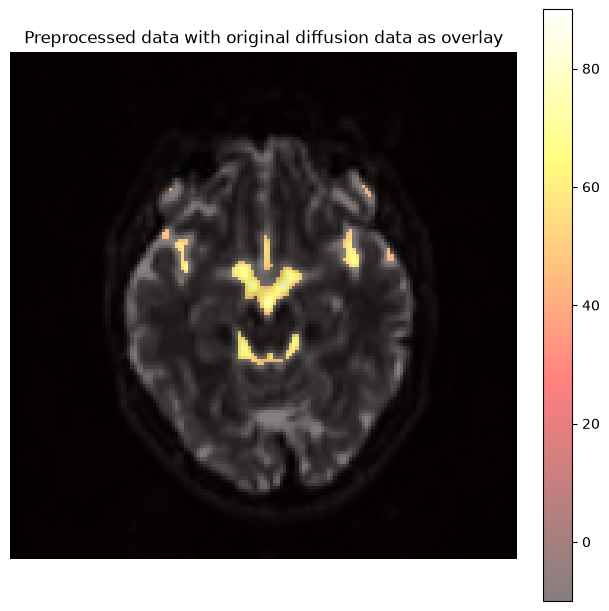
Dependencies in Jupyter/Python
Using the package watermark to document system environment and software versions used in this notebook, alongside the Neurodesktop version extracted from the
JUPYTER_IMAGEorNEURODESKTOP_VERSIONenvironment variables.
import os

%load_ext watermark

%watermark
%watermark --iversions

neurodesktop_version = (
    os.environ.get('JUPYTER_IMAGE', '').split(':')[-1] or
    os.environ.get('NEURODESKTOP_VERSION', 'unknown')
)

print(f"Neurodesktop version: {neurodesktop_version}")
Last updated: 2026-10-08T16:20:21.441951+00:00
Python implementation: CPython
Python version : 3.13.15
IPython version : 9.17.1
Compiler : GCC 15.3.0
OS : Linux
Release : 6.8.0-111-generic
Machine : x86_64
Processor : x86_64
CPU cores : 16
Architecture: 64bit
matplotlib: 3.11.2
nibabel : 5.4.2
numpy : 2.5.3
Neurodesktop version: 2026-10-05
- Tournier, J.-D., Smith, R., Raffelt, D., Tabbara, R., Dhollander, T., Pietsch, M., Christiaens, D., Jeurissen, B., Yeh, C.-H., & Connelly, A. (2019). MRtrix3: A fast, flexible and open software framework for medical image processing and visualisation. NeuroImage, 202, 116137. 10.1016/j.neuroimage.2019.116137